
Living Off the Cloud: A Python Implant Hiding Its Entire C2 Inside Microsoft 365 & Azure
Published August 18, 2026
- Executive summary
- Key findings
- How we got here
- Attack chain
- What we recovered
- C2 Architecture: everything inside the trust boundary
- Credential theft through a fake Windows lock screen
- Persistence: one technique you should know about
- Implant capabilities
- Infrastructure preparation
- Threat intelligence
- Recommendations
- Indicators of compromise
- References
Executive Summary
The Ontinue Cyber Defense Center uncovered an undocumented Python implant framework while investigating an ongoing campaign in July 2026. We track it internally as TWINLOOT, named after its SharePoint C2 folder ‘TwinLoot’
TWINLOOT is a modular, PyArmor-hardened Python implant designed to operate its entire command-and-control infrastructure inside trusted Microsoft services. Tasking flows through SharePoint Online file dead-drops via the Microsoft Graph API. Interactive operator access routes through WebRTC DataChannels relayed by Microsoft Teams TURN servers. Graph API traffic is driven through a headless instance of the victim’s own Edge browser, making it indistinguishable from legitimate user activity. The implant harvests Windows credentials via pixel-faithful fake lock screens, provides a reverse SOCKS5 pivot into victim networks, executes arbitrary commands, and persists through four mechanisms. One instance involved an offline‑forged mandatory profile hive created without administrative privileges. This used a technique called “Corrupting the Hive Mind,” the first recorded malicious use of this persistence method in the wild.
We recovered the modules from under PyArmor 9.2.5 protection and decrypted the embedded configuration, giving us visibility into the operator infrastructure, including the SharePoint C2 site, the Azure Blob config dead-drop, and the attacker-registered domains.
Key findings
- All primary C2 channels terminate at Microsoft IP space. SharePoint Online (Graph API) for tasking, Teams TURN relays for interactive access, and the victim’s own Edge browser for Graph traffic. No C2 communication touches an attacker-owned domain by default.
- A persistence technique known as “Corrupting the Hive Mind“, requires no admin rights. The implant forges a mandatory profile hive (NTUSER.MAN) offline using “offreg.dll” and “RegLoadAppKeyW”, achieving persistence without registry modification events and without elevation.
- Second in-the-wild Teams TURN abuse, and the first using WebRTC DataChannels. Following DragonForce’s Backdoor.Turn (Symantec, June 2026), TWINLOOT is the second observed case of Teams TURN relay abuse, and the first to use actual WebRTC DataChannels as demonstrated in Praetorian’s TURNt research.
- Headless Edge defeats process-based detection. Graph API calls are issued as same-origin fetch() requests from within an Edge browser tab via CDP, making the C2 traffic originate from a legitimate msedge.exe process rather than python.exe.
- The credential phisher that never validates passwords. The primary lock screen uses a native Tkinter window, with an HTML version (from Windows11LockScreenSimulator) as a fallback
- Complete static recovery. 115 of 120 -encrypted modules decrypted, embedded AES-256-GCM config recovered offline. Full C2 endpoints, operator command set, and infrastructure credentials were obtained.
- Infrastructure was deliberately staged over seven weeks using drop-caught aged domains, a joint TLS certificate proving single-operator control, and a hosting ASN previously flagged for credential-attack campaigns.
How we got here
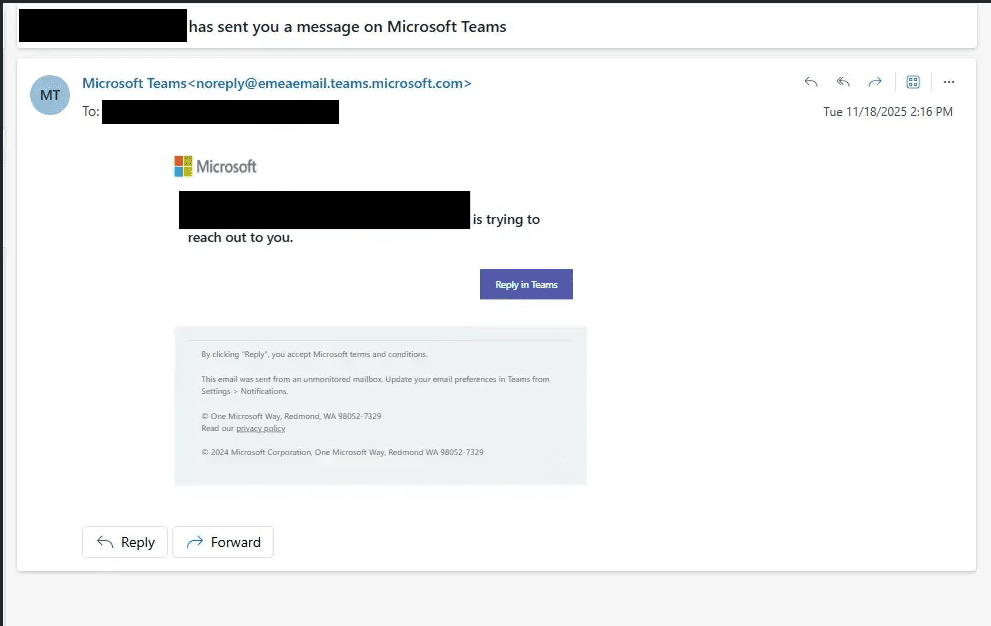
The initial compromise occurred via social engineering on Microsoft Teams. An external actor impersonating IT support convinced a user to run a PowerShell command that downloaded an archive containing a staged Python 3.12.9 embeddable runtime and a 39 MB compiled payload. When we were engaged, the implant was already running. Initial triage revealed the payload, bootstrap-fat.pyc, was a stage-0 loader carrying an embedded 29 MB ZIP of dependencies and malware modules. The second stage was locked behind PyArmor 9.2.5 Pro encryption, rendering roughly 120 modules unreadable by conventional decompilation. Rather than detonate the sample in a sandbox, we took the static route. Using the open-source Pyarmor-Static-Unpack-1shot tool, we were able to recover 115 modules. The embedded configuration decrypted cleanly, handing us the complete live C2 infrastructure.
What emerged was not a simple backdoor. It was a full-featured implant framework built by someone who understood both offensive tradecraft and Microsoft’s cloud architecture. The developer had staged two expired domains weeks in advance, registered a purpose-built Azure AD application, stood up a SharePoint site as a dead-drop, and ported a cutting-edge conference tool into a production Python implant, all within a seven-week window. The result: an interactive SOCKS5 proxy that exits from the victim’s own process into their internal network, turning a single compromised endpoint into a pivot point for lateral movement.
TWINLOOT is the first we have seen to combine Microsoft 365 dead-drop C2, Teams TURN relay abuse and headless browser transport within a single framework. It shows the gap between “conference research” and “operational tooling” has narrowed to weeks.
Attack chain
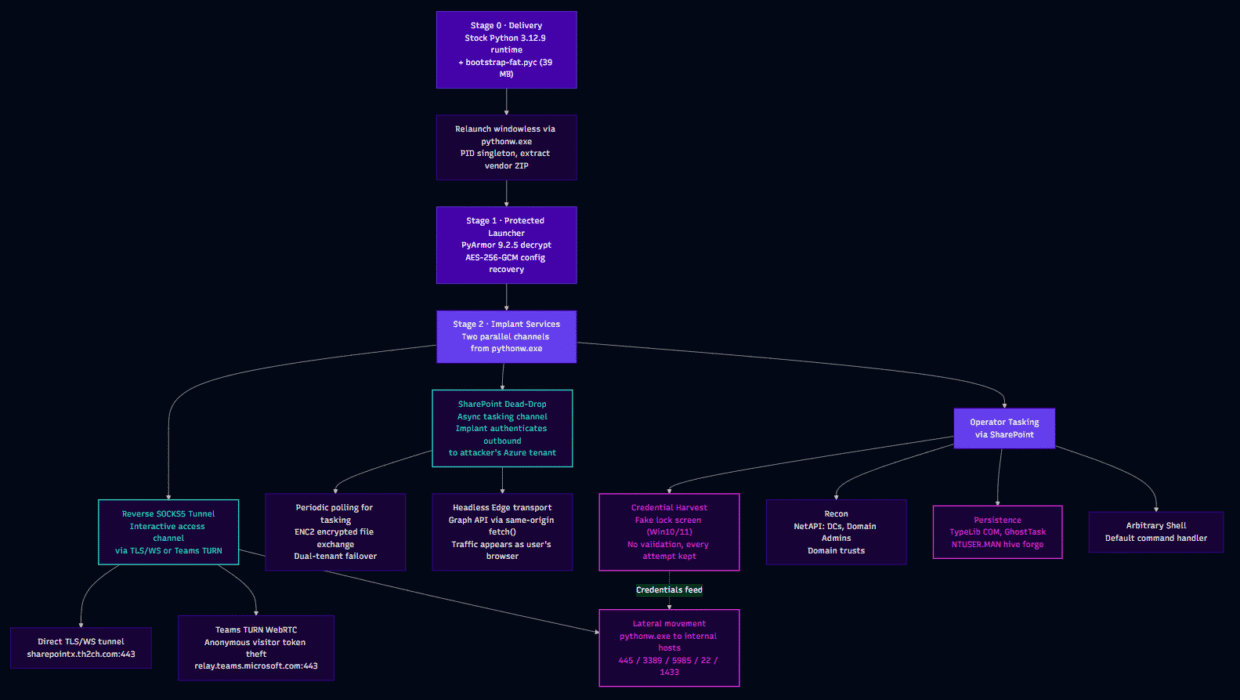
Figure 1 – Attack Chain
What we recovered
The payload ships as a stock, validly signed Python 3.12.9 embeddable runtime (untampered; Authenticode signatures verify) alongside a single file: bootstrap-fat.pyc, a 39 MB compiled Python module carrying a 29 MB embedded dependency bundle.
The stage-0 loader is unobfuscated. Its own docstring describes its job: ‘Stage0 loader (stdlib only): VENDOR_ZIP_B64 -> ./lib -> launcher.bootstrap_core.’ It relaunches itself windowless via pythonw.exe, enforces a single instance through a PID lockfile, extracts the embedded ZIP (SHA-256 pinned, zip-slip guarded), ensures a Tcl/Tk GUI runtime is present, and hands off to the second stage.
That second stage (roughly 120 modules) was protected by PyArmor 9.2.5 Pro (leaked license 011971, build tag LAUNCHER). Using the open-source Pyarmor-Static-Unpack-1shot tool, we statically decrypted 115 of the ~120 modules. The stage-1 launcher stores its configuration as an AES-256-GCM blob with the key and AAD embedded alongside it, so we decrypted that offline too. Pure cryptography, no sandbox required.
The result: complete visibility into every C2 endpoint, every operator command, every persistence mechanism, and every credential in the build. Build-machine paths leaked into the compiled bytecode place the developer at C:\Users\Admin\LAUNCHER\…, with modules compiled on 24 July 2026 between 18:13 and 18:15 UTC. Cached .pyc files in the Tkinter directory show the operator test-ran the bundle on the build machine before shipping.
C2 Architecture: everything inside the trust boundary
TWINLOOT runs two parallel channels from the victim host, each serving a different purpose. Understanding the split is important for detection.
The SharePoint dead-drop is the always-on tasking channel. The implant (pythonw.exe) authenticates outbound to the attacker’s Azure tenant and polls a SharePoint drive for commands every 15 seconds. This is how the operator issues tasking, receives results, and exfiltrates harvested credentials and recon data. The traffic originates from the victim endpoint going outbound to login.microsoftonline.com, graph.microsoft.com, and kerteransens.sharepoint.com, all on the attacker’s tenant. The victim organisation’s own M365 environment is not involved in this authentication flow.
The reverse SOCKS5 tunnel is the interactive access channel. It runs over either a direct TLS/WebSocket connection to the attacker’s server or through the Teams TURN WebRTC relay. The operator gets a SOCKS5 listener on their own machine (127.0.0.1:1080) and proxies traffic through it into the victim’s internal network. Those connections exit from pythonw.exe on the victim host to internal targets on ports like 445 (SMB), 3389 (RDP), 5985 (WinRM), and 1433 (MSSQL). To the victim’s internal network, it looks like the compromised host is making normal lateral connections.
Both channels run simultaneously from the same pythonw.exe process. The SharePoint channel handles async tasking and data exfiltration; the SOCKS5 tunnel handles real-time interactive access and lateral movement.
Reverse SOCKS5 as the lateral movement plane
The reverse SOCKS5 tunnel is where the real operational damage happens. Once established (via either the direct TLS/WS tunnel or the Teams TURN channel), the operator has an interactive proxy that exits from the victim’s pythonw.exe process into the victim’s internal network.
The multiplexer (tunnel/multiplexer.py, tunnel/stream.py) supports up to 128 concurrent TCP streams over a single encrypted C2 channel. Each stream carries a different proxied connection. The operator’s socks-ctl CLI (Sliver-style) manages connections through this tunnel.
What this means operationally: the operator harvests the victim’s password via the fake lock screen (exfiltrated through the SharePoint channel), then immediately uses those credentials through the SOCKS5 tunnel to RDP or WinRM into the next host. The compromised endpoint becomes a pivot point. To internal network defences, the lateral movement traffic looks like the compromised user’s workstation making normal administrative connections.
The detection seam is the process: pythonw.exe fanning out to multiple internal IPs on administrative ports (445, 3389, 5985, 22, 1433, 135, 389) is not normal workstation behaviour, regardless of what credentials are being used.
Teams TURN as the interactive data plane
The reverse SOCKS5 tunnel needs a transport to reach the operator. TWINLOOT offers two: a direct TLS/WebSocket connection to the attacker’s server (sharepointx.th2ch[.]com:443), and a stealthier option that routes through Microsoft’s own Teams media infrastructure.
For the Teams path, the implant establishes WebRTC DataChannels relayed through ‘turns:worldaz-msit.relay.teams.microsoft[.]com:443’. The operator’s SOCKS5 traffic enters the WebRTC channel on their end, transits through the Microsoft TURN relay, and exits from pythonw.exe on the victim’s host. A defender sees the victim’s endpoint holding a long-lived TLS session to a legitimate Microsoft relay server. The SOCKS5 proxy traffic riding inside it is invisible without TLS inspection.
TURN credentials aren’t hardcoded. They’re stolen live from Teams’ anonymous visitor endpoints: a POST to teams.microsoft.com/api/authsvc/v1.0/authz/visitor with an empty Authorization: Bearer header and Ms-Teams-Auth-Type: ExplicitLogin yields a Skype token, which is exchanged at /trap-exp/tokens for a one-hour TURN username and password.
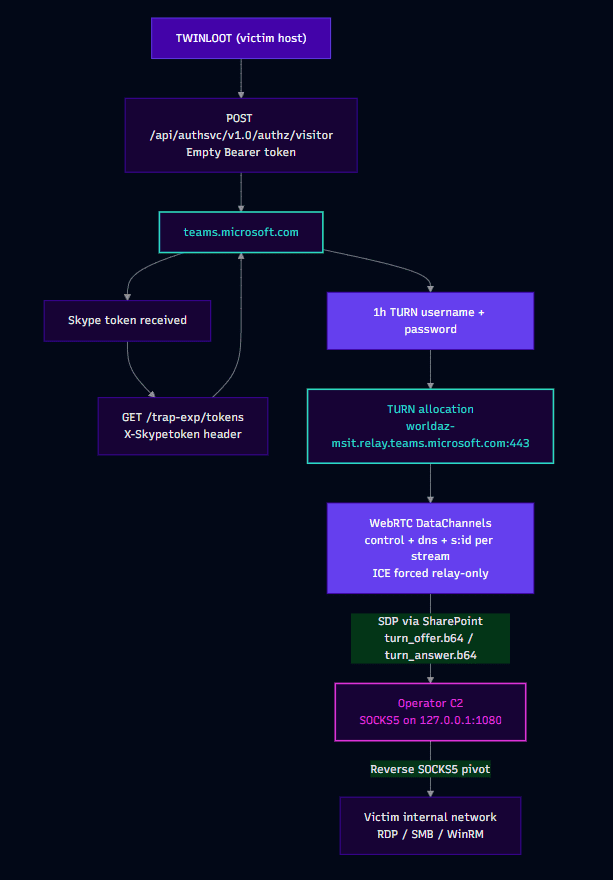
Figure 2 – Teams TURN
The code is a Python port of Praetorian’s TURNt (https://github[.]com/praetorian-inc/turnt), the tool released alongside the ‘Ghost Calls’ research at Black Hat USA 2025. ICE is forced to relay-only (the victim’s real IP never appears in signalling), SDP offer and answer travel via the SharePoint dead-drop, and the result is an unauthenticated SOCKS5 proxy on the operator’s machine that exits inside the victim’s network. Every internal connection appears to originate from the victim host’s own pythonw.exe.
This is only the second observed in-the-wild abuse of Teams TURN infrastructure, after DragonForce’s Go-based Backdoor.Turn (Symantec, June 2026). But the implementations are fundamentally different: DragonForce used QUIC sessions through the relay, whilst TWINLOOT uses actual WebRTC DataChannels via aiortc, which is what TURNt itself demonstrated. On 23 July 2026, one day before TWINLOOT was compiled, Cisco Talos published their analysis of Chaos group’s msaRAT, which uses the same class of technique (headless browser + TURN relay) but routes through Twilio rather than Teams. Three independent actors adopted TURN relay abuse within six months of the Black Hat talk.
Headless Edge as a Graph transport
This is the component we find most interesting from a detection-evasion standpoint.
The implant launches the victim’s own Microsoft Edge in headless mode:
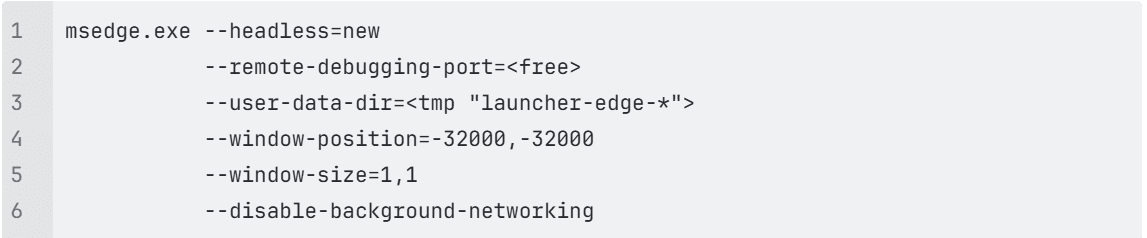
It attaches via the Chrome DevTools Protocol over a local WebSocket, navigates a tab to graph.microsoft[.]com, and issues all Graph API calls as same-origin “fetch()” requests from within the browser page context via Runtime.evaluate.
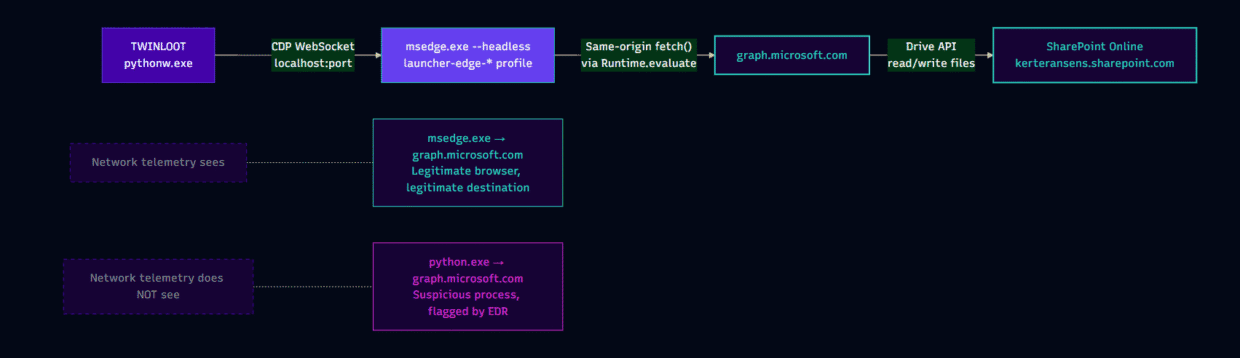
Figure 3 – Headless Edge Transport
To network telemetry, the Graph C2 traffic is the user’s browser talking to Microsoft because it literally is. The msedge.exe process, with a legitimate user-data directory, makes HTTPS requests to graph.microsoft.com. Any detection rule that keys on python.exe or pythonw.exe communicating with Graph endpoints will miss this entirely. The token fetch itself still uses urllib (a potential detection seam), but the actual C2 payload exchange runs through Edge.
Chaos group’s msaRAT uses the same headless-browser-via-CDP architecture, but for WebRTC signalling through Cloudflare Workers. The convergence is notable: two unrelated actors independently arrived at ‘drive the victim’s own browser as a C2 transport’ within the same month.
Fallback and configuration resilience
Runtime configuration refreshes every 300 seconds from an Azure Blob Storage dead-drop. We verified this endpoint is live as of publication. The returned JSON matches the decrypted embedded config exactly, confirming both our decryption and the operator’s continued activity.
An Ethereum eth_call module (EtherHiding-style blockchain config resolution) ships in the codebase but is unused in this build. The mechanism is present, the RPC endpoints are not populated, providing evidence of an actively developed framework with variants we have not yet seen.
Credential theft through a fake Windows lock screen
On operator command (credz_waiting), the implant renders a pixel-faithful fake Windows lock screen. Tkinter-based kits exist for both Windows 10 and Windows 11, selected by OS build number, each populated with the victim’s real data:
- Display name via GetUserNameExW
- Account picture carved from %APPDATA%\Microsoft\Windows\AccountPictures
- Lock-screen wallpaper sourced from PersonalizationCSP, SystemData, or Spotlight registry keys
A 250 ms black flash-cover masks the transition. The window runs fullscreen, always-on-top, with the close button disabled.
Two details matter for defenders. First, there is no password validation of any kind. The primary lock screen is a Tkinter-based native window; an HTML variant (derived from Windows11LockScreenSimulator) serves as a fallback. Neither variant checks the entered password against Windows authentication or any other mechanism. Every attempt is packaged as JSON, encrypted, and uploaded to the SharePoint drive. The victim sees ‘The password is incorrect. Try again.’ after the first attempt regardless of what was typed (matching real lock-screen behaviour), and the window closes after the second, typically harvesting both the mistyped and the correct password.
Second, anti-escape is deliberately minimal. Fullscreen and topmost, but no keyboard hooks, no BlockInput (declared but unused). The developer traded lock-in for reliability and code simplicity. Window classes are launcher_black_screen_31337 and launcher_fake_lockscreen_view.
The HTML variant of the lock screen is derived from Windows11LockScreenSimulator (https://github[.]com/PrPunk/Windows11LockScreenSimulator), a public GitHub project. The payload does not bundle these resources; it hot-links a background video and loading animation from https://raw.githubusercontent[.]com and i.postimg.cc at runtime, so the lock screen renders only on hosts with outbound internet access. We make no claims about who authored or controls that project, and found nothing connecting it or its maintainers to this campaign; it appears to have been selected opportunistically as ready-made markup. The retrieval is a usable detection signal: outbound requests from non-browser processes to raw.githubusercontent[.]com/PrPunk/WEBFILES/ are anomalous on most endpoints, but it is not attacker infrastructure and is excluded from the indicator table deliberately. Pair it with a host-side signal rather than blocking the hosting domain, which is in broad legitimate use. Note also that blocking the fetch suppresses the lock screen without affecting anything else in the chain: absence of the lock screen is not evidence of failed execution.
Our working theory on the credential harvest: the phished password feeds directly into lateral movement via the reverse SOCKS5 tunnel. The operator has an interactive proxy into the victim’s network; harvested credentials enable RDP, SMB, or WinRM access to internal hosts that the victim machine can reach. RDP, SMB, or WinRM access to internal hosts that the victim machine can reach.
Persistence: one technique you should know about
TWINLOOT includes four persistence mechanisms, all operator-triggered rather than automatic (PERSIST_ENABLED=False in this build). Three are well-documented in existing literature. One, while publicly researched, has not been observed in malicious use until now.
TypeLib COM scriptlet hijack: HKCU\Software\Classes\TypeLib\{EAB22AC0-30C1-11CF-A7EB-0000C05BAE0B}\1.1\0\win32|win64 pointing to script:C:\ProgramData\PackageCache\Config.sct, plus a Run key (UserExperienceSync). Classic scrobj.dll abuse, effective but well-understood.
GhostTask-style TaskCache manipulation: binary blobs written directly to HKLM\Schedule\TaskCache\{Tree,Tasks,Plain} without the SD security descriptor value, making the task invisible to schtasks /query and Task Scheduler. The task name is UserExperienceSyncTask with a six-hour repeat interval. This requires admin privileges and a Schedule service restart. The technique has been publicly documented since the Tarrask disclosure in 2022.
Self-update: a reobf.json manifest delivers a full replacement bootstrap with three relaunch modes (file, spawn, schtasks /Run). Mostly operational hygiene.
NTUSER.MAN mandatory-profile hive forging (no admin required)
This is the first time we have observed this technique used by a threat actor in the wild.
The underlying research was first published by Praetorian in January 2026 (“Corrupting the Hive Mind”). Praetorian released the open-source tool Swarmer for red team use, operational since February 2025. TWINLOOT’s implementation uses the same RegLoadAppKeyW + offreg.dll approach described in that research, adapted into the implant’s Python codebase.
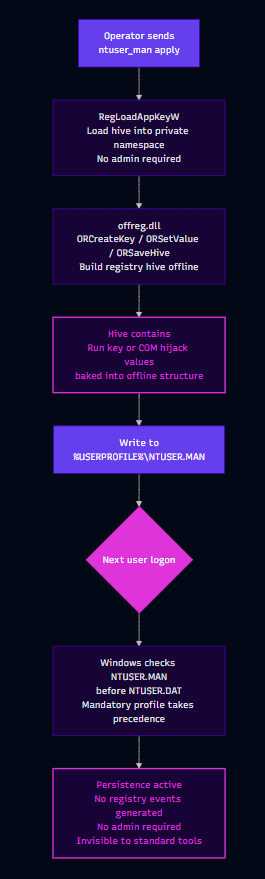
Figure 4 – NTUSER.MAN Persistence
The implant builds a mandatory Windows profile hive entirely offline using two APIs: RegLoadAppKeyW (which loads a registry hive into a private application namespace without requiring admin privileges) and Microsoft’s offline registry library offreg.dll (ORCreateKey, ORSetValue, ORSaveHive). The resulting hive is written to %USERPROFILE%\NTUSER.MAN.
When Windows loads a user profile, it checks for NTUSER.MAN (a mandatory profile override) before NTUSER.DAT. If NTUSER.MAN exists, its contents take precedence. By crafting this hive offline with the appropriate Run key or COM hijack values baked in, the implant achieves persistence that:
- Requires no administrative privileges (the user owns their own profile directory)
- Generates no registry modification events at write time (the hive is built offline, not written to the live registry)
- Survives profile reloads and logon/logoff cycles
- Is not flagged by most standard persistence-scanning tools
The operator triggers it via the ntuser_man apply command. Static analysis of the decrypted code confirmed that a successful deployment writes NTUSER.MAN to the user profile directory (2,138,112 bytes, offreg_ok: true).irmed that a successful deployment writes NTUSER.MAN to the user profile directory (2,138,112 bytes, offreg_ok: true).
Implant capabilities
Beyond the C2 and credential components, the full command set (recovered from the decrypted code) includes:
- recon: pure environment variables and NetAPI calls (no WMI, no cmd.exe): hostname, FQDN, domain join status, %ProgramData% listing, domain controller and computer enumeration via NetServerEnum, ‘Domain Admins’ membership via NetGroupGetUsers, and domain trust enumeration via DsEnumerateDomainTrustsW.
- screenshot: a PowerShell CopyFromScreen one-liner, output to shot.png.
- tunnel/turn controls: start, stop, and status for both the direct WS/TLS tunnel and the Teams TURN channel.
- wakeup [sec]: adjust the heartbeat interval.
- loadconfig/reloadconfig: hot-reload configuration from the Azure Blob dead-drop.
- ntuser_man show|apply: the persistence mechanism described above.
- fd/on azure: runtime Azure Front Door edge configuration.
- fb/main: tenant failover commands.
- Anything else: any unrecognised command is passed directly to subprocess with shell=True, a 120-second timeout, a 65 KB output cap, and CREATE_NO_WINDOW. The default case is arbitrary command execution.
Infrastructure preparation
The operation’s timeline shows planning, not opportunism. Both C2 domains are aged, expired domains re-registered within two weeks of each other. This is a reputation-inheritance play against domain-age heuristics:
| Date (2026) | Event |
|---|---|
| 07 June | th2ch[.]com re-registered after expiry (NameCheap, privacy shield). Prior owner: a small business site, live as late as March 2026. |
| 07 June | Let’s Encrypt certificate for sharepointx.th2ch[.]com issued ~8 hours after registration. The domain was bought for this purpose. |
| 21 June | lpi-web[.]com drop-caught the day it entered pending-delete (same registrar, same privacy pattern). The name squats on the Linux Professional Institute brand. |
| 21 July | A single joint LE certificate issued covering both lpi-web[.]com and sharepointx.th2ch[.]com, proving one operator controlled both zones. |
| 24 July | Implant compiled (PyArmor build timestamps 18:13 to 18:15 UTC). |
| 27-30 July | Observed continuous heartbeating of the C2 config |
The failover edge sits at 193.24.211[.]221, announced by AS215929 (‘Data Campus Limited’), a hosting ASN previously documented by GreyNoise as one of four networks behind more than nine million credential-attack sessions against Palo Alto GlobalProtect portals in late 2025. We assess the actor rents from criminal hosting infrastructure rather than operating it directly.
Threat intelligence
Operator Profile
Without making attribution claims, the operation has a distinct fingerprint. Despite thorough analysis, we found no infrastructure overlap, shared tooling, or code lineage connecting TWINLOOT to any known threat actor or malware family.
Infrastructure discipline is strong. Seven-week staging window, expired-domain reputation inheritance, joint TLS certificates, dual-tenant SharePoint redundancy, encrypted build-time configuration, and a live Azure Blob config channel that can redirect implants without rotating keys. The decision to authenticate to the attacker’s own Azure tenant rather than abusing the victim’s shows deliberate architectural planning to avoid leaving traces in victim identity logs.
Adoption of public research is fast. The TURN channel is a from-scratch Python port of TURNt, built within weeks of DragonForce’s Backdoor.Turn putting Teams TURN abuse on the map. No public Python port of TURNt exists; this was written independently. The EtherHiding module, the Edge CDP transport, and the dual-tenant failover suggest an actively developed framework with variants we have not yet seen. The convergence with Chaos group’s msaRAT (published one day before TWINLOOT was compiled) on the same headless-browser-via-CDP technique is independently arrived at, not shared. Also included is the Hive Forging technique, adopted from published research in January.
Tradecraft is social-engineering led. Initial access was achieved through a Teams call impersonating IT support, a technique that requires no technical exploit and bypasses endpoint controls entirely. This aligns with a broader trend of vishing-based delivery observed across multiple actor groups in 2025-2026.
Operational parallels exist with two publicly tracked campaigns, though neither constitutes an attribution link. DragonForce’s Backdoor.Turn shares the Teams TURN relay technique but differs in every other dimension:
| Factor | DragonForce | TWINLOOT | Match? |
|---|---|---|---|
| Initial access | MSSQL/access broker | Teams vishing | No |
| Language | Go | Python | No |
| TURN abuse | Yes (Teams TURN) | Yes (Teams TURN) | Yes |
| Tooling | DLL sideloading, BYOVD | PyArmor Python, headless Edge | No |
| Ransomware | DragonForce locker | None in this build | Different |
A Sophos-tracked threat actor, STAC4749, an activity cluster linked to the Chaos ransomware-as-a-service operation, shows stronger operational parallels:
| Factor | STAC4749 | TWINLOOT | Match? |
|---|---|---|---|
| Initial access | Teams vishing, fake IT support | Teams vishing, fake IT support | Yes |
| Python backdoor | PyArmor-obfuscated PyInstaller backdoor | PyArmor 9.2.5 Pro Python implant | Yes |
| Reverse SOCKS proxy | Custom reverse SOCKS proxy tool (sc5.exe) deployed alongside backdoor | Built-in reverse SOCKS5 (128 streams) | Yes |
| Persistence | HKCU Run keys with masqueraded names | HKCU Run key (UserExperienceSync) | Yes |
| C2 via Cloudflare/CDN | Payloads hosted behind Cloudflare | Azure Blob + SharePoint (cloud-hosted) | Partial |
| Timeline | February to June 2026 | Built July 2026 | Adjacent |
| Targeting | North America (Canada 50%, US 44%) | Not disclosed | Unknown |
| Certificate pinning | Hard-coded CA certs in payloads | Pinned ISRG Root X1 (Let’s Encrypt) | Similar pattern |
| Ransomware | Chaos ransomware deployed | No ransomware in this build | Different |
| Language | Go implants + Python backdoor | Python only | Partial |
| msaRAT link | Chaos group also built msaRAT (headless browser + CDP + TURN) | Headless Edge + CDP + Teams TURN | Same technique class |
The STAC4749 overlaps are notable: Teams vishing delivery, a PyArmor-obfuscated Python backdoor, a reverse SOCKS5 proxy, HKCU Run key persistence, and an adjacent timeline. However, the underlying implementations differ substantially. STAC4749 uses PyInstaller packaging, Go-based implants, standalone SOCKS5 proxy tooling, and .top domains behind Cloudflare. TWINLOOT uses raw .pyc execution, pure Python, an integrated SOCKS5 multiplexer, and drop-caught aged domains with SharePoint dead-drop C2. If these are the same operator, the tooling was rebuilt from scratch rather than evolved. We assess no direct link with current evidence, but note the parallels for future correlation.
Recommendations
- Monitor endpoint network telemetry for connections to SharePoint sites outside your organisation. TWINLOOT’s C2 operates through a SharePoint site on the attacker’s own Azure tenant, not the victim’s. Because the implant authenticates directly to the attacker’s tenant using embedded credentials, no sign-in or audit events appear in the victim’s Entra ID logs. Detection sits at the endpoint and network layer: configure your EDR, proxy, or CASB to flag managed endpoints connecting to *.sharepoint[.]com hostnames that do not belong to your organisation’s tenant.
- Restrict or disable Teams external access where not required to prevent external communication between threat actor and users.
- Disable headless mode and remote debugging for Microsoft Edge
on standard workstations as TWINLOOT requires both capabilities
to proxy Graph API traffic through the user’s browser. Two Edge
policies counter this directly:- HeadlessModeEnabled > Disabled
(Intune: Microsoft Edge > Control use of the Headless Mode) - RemoteDebuggingAllowed > Disabled
(Intune: Microsoft Edge > Allow remote debugging)
workstations where headless browser usage is a legitimate business requirement. - HeadlessModeEnabled > Disabled
- Treat Python runtimes in user-writable paths as suspicious. TWINLOOT ships a legitimately signed Python embeddable runtime in a non-standard location. Check on ‘python.exe’ or ‘pythonw.exe’ executing from %APPDATA%, %LOCALAPPDATA%, %TEMP%, or C:\ProgramData\ outside of approved software deployments.
- Reset credentials for any user who may have encountered the lock-screen phish. TWINLOOT’s fake lock screen captures every password attempt without validation. If compromise is suspected, immediately reset the affected user’s password and revoke their refresh tokens via revokeSignInSessions.
- Deploy phishing-resistant authentication methods such as FIDO2 keys and passkeys. Deploying these across your organisation eliminates the credential harvest technique entirely, regardless of how convincing the fake lock screen is.
Indicators of compromise
See IOC document here: GitHub link.
References
- Praetorian – TURNt / “Ghost Calls” – Black Hat USA 2025. TURN relay abuse as a covert C2 channel. Ancestor of TWINLOOT’s Teams TURN implementation.
- Symantec – Backdoor.Turn: DragonForce – June 2026. First documented in-the-wild abuse of Microsoft Teams TURN relay infrastructure.
- Cisco Talos – Chaos msaRAT – July 2026. Headless browser via CDP + Twilio TURN relay C2. Independent convergence on browser-as-transport technique.
- FortiGuard Labs – Havoc via SharePoint – March 2025. SharePoint + Graph API dead-drop C2.
- Group-IB – HOLLOWGRAPH – July 2026. Microsoft 365 calendar events as a two-way C2 dead-drop via Graph API.
- CyCraft – GRAPHBROTLI / GRAPHRELOOK – March 2026. Multiple Graph-based dead-drop resolvers targeting Taiwan.
- Pyarmor-Static-Unpack-1shot – Open-source tool used for static PyArmor decryption.
- Microsoft – Tarrask / GhostTask – April 2022. Original documentation of TaskCache manipulation for invisible scheduled tasks.
- GreyNoise – AS215929 / Data Campus – December 2025. Credential-attack campaigns from AS215929 infrastructure.
- Microsoft Edge – HeadlessModeEnabled Policy – Edge policy to disable headless browser mode. CIS Benchmark Level 2.
- Microsoft Edge – RemoteDebuggingAllowed Policy – Edge policy to disable remote debugging. CIS Benchmark Level 1.
- Canadian Centre for Cyber Security – EtherHiding – March 2026. Analysis of EtherHiding technique for C2 config resolution.
- STAC4749 – July 28, 2026, Sophos analysts investigated a Microsoft Teams voice phishing (vishing) campaign tracked as STAC4749 that used a consistent set of IT-themed cloud domains

Rhys is a Threat Researcher at Ontinue. Rhys started his career in IT, as a technician, which is where he discovered the world of cybersecurity. He ultimately decided to complete his degree in cyber and then landed his first role as a SOC analyst in 2021.
He said that what interests him the most about security is malware. He loves analyzing it and breaking it down to uncover its capabilities.