


Nezha: The Monitoring Tool That’s Also a Perfect RAT
Summary
Ontinue’s Cyber Defense Center discovered attackers using Nezha, a legitimate open-source monitoring tool, as a post-exploitation RAT. The agent provides SYSTEM/root level access, file management, and an interactive web terminal. VirusTotal shows 0/72 detections because it isn’t malware, it’s legitimate software pointed at attacker infrastructure.
Installation is silent. Detection only occurs when attackers execute commands through the agent. Organisations should hunt for Nezha presence proactively and ensure behavioural monitoring is in place to catch post-exploitation activity.
What Is Nezha
Nezha is an open-source server monitoring tool initially developed for the Chinese IT community. It has gained nearly 10,000 stars on GitHub and is actively maintained. System administrators use it to monitor multiple servers, track resource usage, receive alerts, and perform remote maintenance.
Its architecture features a central dashboard server coordinating lightweight agents on monitored systems, allowing administrators to view system health, execute commands, transfer files, and open interactive terminal sessions.
However, these capabilities including: remote command execution, file transfer, and interactive shell access are also attractive to attackers. While Nezha was not intended for malicious use, it can be used maliciously. This is also not the first time Nezha has been observed in the wild.
Huntress published research on Nezha abuse in October 2025, documenting similar activity targeting organisations across East Asia.
Discovery in the Wild
So during an incident that was handled by Ontinue SOC, we discovered a post-Exploitation attempt at deploying a bash script onto a device. In that script was the following:
Script Analysis
This deployment script reveals several things about the attacker’s tradecraft and operational considerations.
- Server (C2) – variable points to the attacker’s command and control infrastructure.
- Secret – The value is the authentication token that allows the agent to connect to the dashboard. This 32-character alphanumeric string acts as a shared secret between the agent and the attacker’s server.
- TLS – Set to “false” – The option to disable TLS is unknown.
- URL – Points to a GitHub proxy service rather than directly to GitHub.
The script includes basic error handling with Chinese-language status messages:
- “正在下载哪吒监控 Agent 脚本…” translates to “Downloading Nezha monitoring Agent script…”
- “下载成功。” translates to “Download successful.”
- “下载失败,请检查网络连接。” translates to “Download failed, please check network connection.”
The use of Simplified Chinese throughout the script suggests a Chinese-speaking author. The messages are written naturally, not machine-translated, indicating a native or fluent speaker. However, language alone doesn’t confirm attribution. These indicators are trivially easy to fake, and we’re not drawing conclusions about who is behind this based on language choices or proxy URLs.
Once I had looked into Nezha more and after reviewing previous research, I understood that you can view the dashboard of every Nezha instance hosted online. So, using the C2 in a sandbox, I was able to view the dashboard, discovering that this threat actor has potentially compromised hundreds of endpoints.
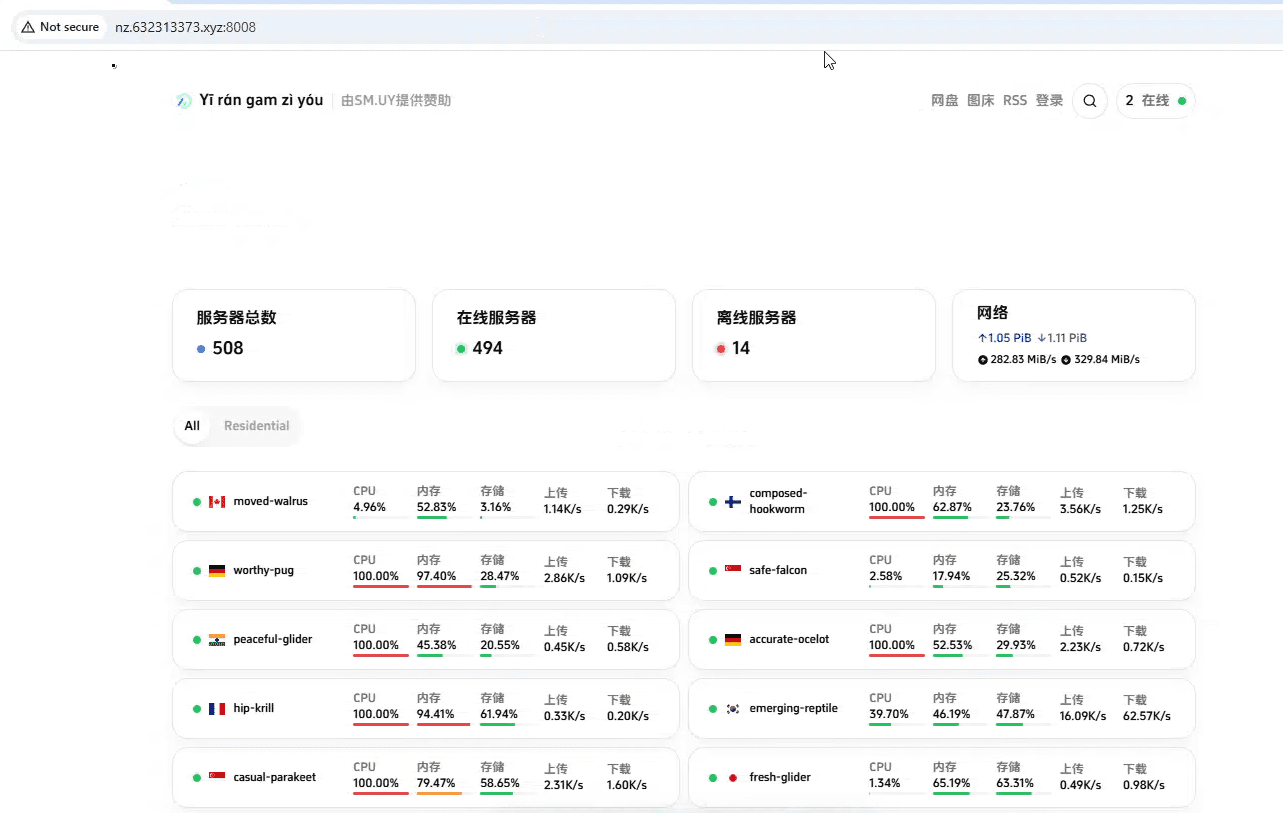
Looking into where this was hosted, we discovered the domain was being hosted on Alibaba Cloud services. The domain was pointed to 47.79.42[.]91, which matches the range below. IPInfo had this geo-located in Japan.
ASN AS45102 – Alibaba (US) Technology Co., Ltd.
Hostname: No Hostname
Range: 47.79.40.0/21
Company: Alibaba Cloud LLC
Nezha Technical Deep-Dive
Nezha follows a simple client-server model. A central dashboard server handles authentication, stores configuration, and coordinates all connected agents. Agents are lightweight binaries deployed on monitored hosts that maintain persistent gRPC connections back to the dashboard.
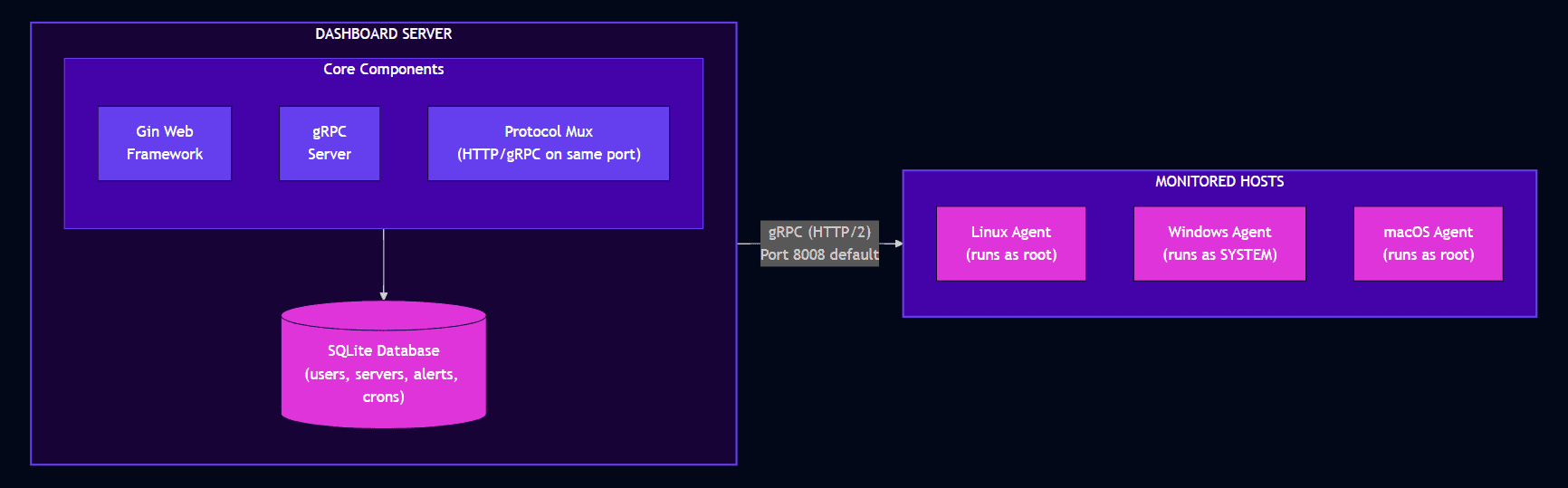
The dashboard multiplexes HTTP and gRPC traffic on the same port. Web browsers connect via HTTP/WebSocket for the dashboard interface; agents connect via gRPC for command and control. This design means a single exposed port provides both the management interface and agent communication channel.
Agent Capabilities
The agent supports a defined set of task types, each identified by a numeric constant:
| Task Type | ID | Description |
|---|---|---|
| HTTP GET | 1 | HTTP health check requests |
| ICMP Ping | 2 | Network reachability testing |
| TCP Ping | 3 | Port availability checking |
| Command | 4 | Arbitrary command execution |
| Terminal (Legacy) | 5 | Legacy terminal implementation |
| Upgrade | 6 | Agent self-update |
| Keepalive | 7 | Connection maintenance |
| Terminal (gRPC) | 8 | Interactive terminal session |
| NAT | 9 | NAT/reverse proxy handling |
| File Manager | 11 | File operations (browse, upload, download, delete) |
| Report Config | 12 | Report current configuration |
| Apply Config | 13 | Apply new configuration |
For legitimate monitoring, most of these make sense. For an attacker, types 4, 8, and 11 are the interesting ones: command execution, interactive terminal, and file management. These provide complete control over compromised hosts.
Authentication Model
Dashboard Authentication
Users authenticate via username/password, receiving a JWT token. OAuth2 is also supported for federated authentication. Default credentials on first run are “admin:admin”
Agent Authentication
Agents authenticate using a shared secret (client_secret) passed in gRPC metadata. One secret per user, shared across all that user’s agents. If an attacker obtains this secret, they can connect rogue agents or potentially interact with existing ones.
Role-Based Access
Two roles exist, Admin (full access) and Member (access to own resources only). Admins can access any server’s terminal; members can only access servers they own.
Default Configuration
Key defaults that matter for detection and hunting:
| Setting | Default Value |
|---|---|
| Dashboard port | 8008 |
| Protocol | HTTP/2 (gRPC) and HTTP/1.1 multiplexed |
| TLS | Disabled by default |
| Default credentials | admin:admin |
| Agent config location (Linux) | /opt/nezha/agent/config.yml |
| Agent config location (Windows) | C:\nezha\config.yml |
What We Observed When Testing Nezha
To understand the full capability set, we deployed Nezha in a controlled environment. The results confirmed the documentation and highlighted why this tool is so effective for attackers.
Privilege Confirmation
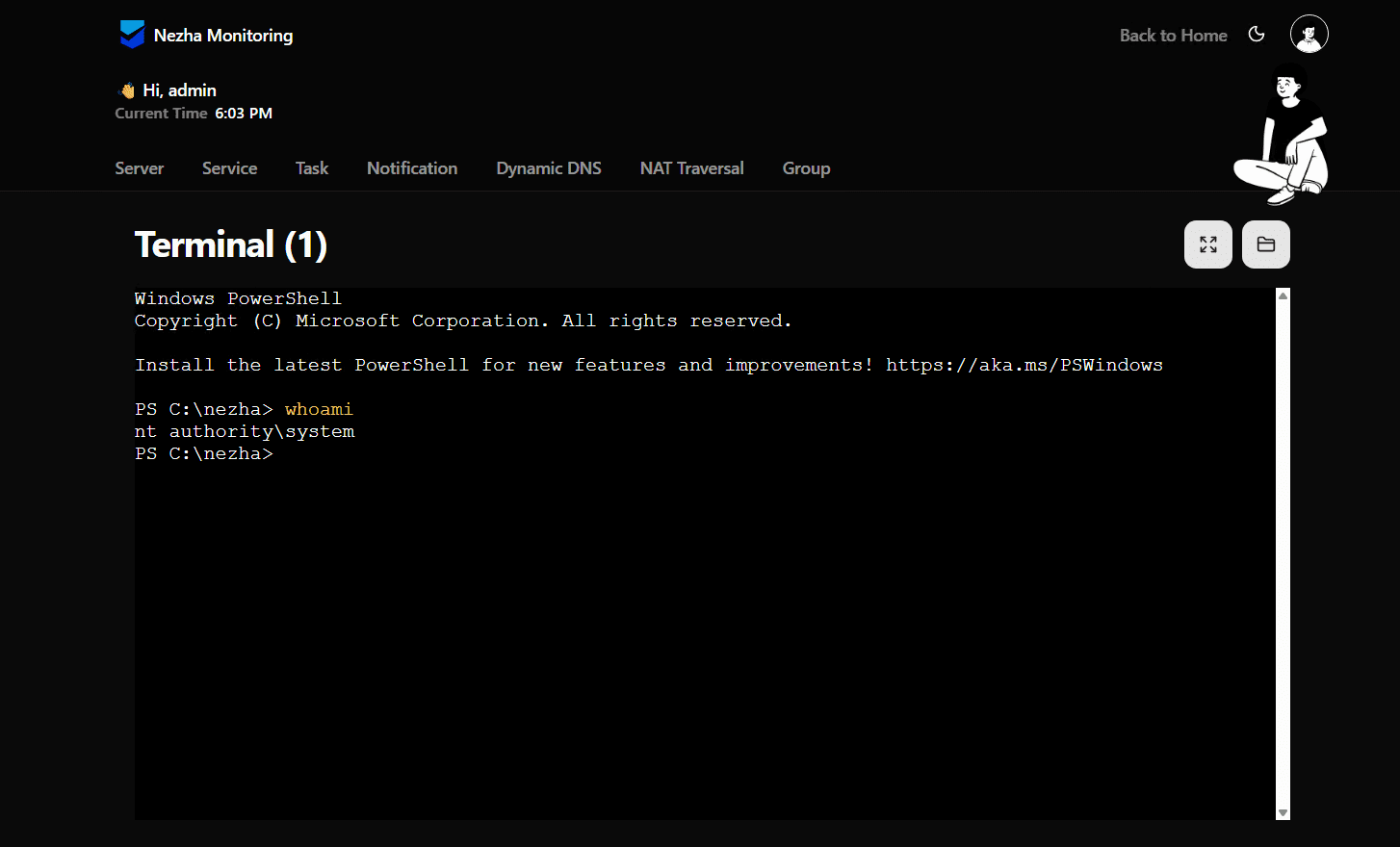
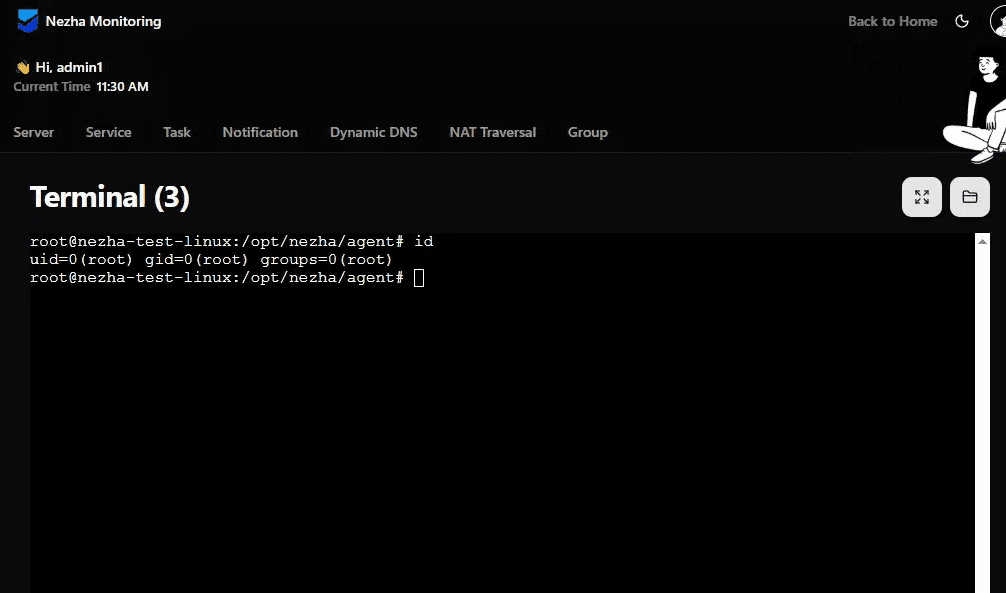
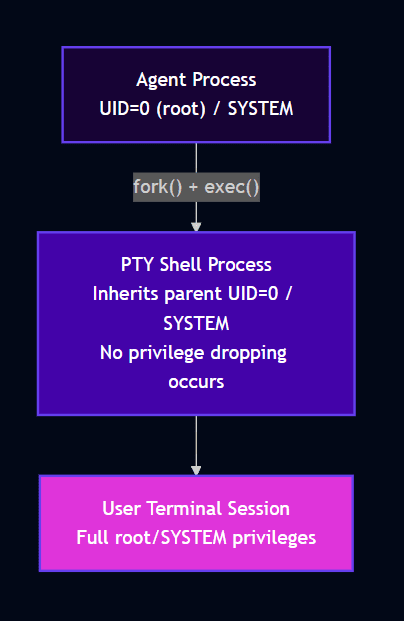
On a Windows target, the Nezha terminal provided a fully interactive PowerShell session running as ‘NT AUTHORITY\SYSTEM’. On Linux, we obtained a root shell. No privilege escalation required. No exploitation needed. This is simply how the tool works.
Why the Agent Runs as Root/SYSTEM
The Nezha agent is designed to run as root (Linux) / SYSTEM (Windows) because it needs elevated access for:
- Reading /proc filesystem and system metrics
- Accessing network statistics
- Managing processes
- Applying system configurations
When a terminal session is requested, the agent spawns a PTY (pseudo-terminal) that inherits the agent’s process context meaning if the agent runs as root, the shell is root.
Detection Evasion
Nezha fits the pattern of RMM tool abuse that’s become increasingly common, but with capabilities that rival purpose-built RATs. The binary is legitimate, actively maintained, and returns zero detections on VirusTotal. An attacker gains full remote access with a tool that bypasses all checks from Defender. Deployment requires only a one-line terminal command, installing the agent with preconfigured C2 details.
Fofa/Shodan
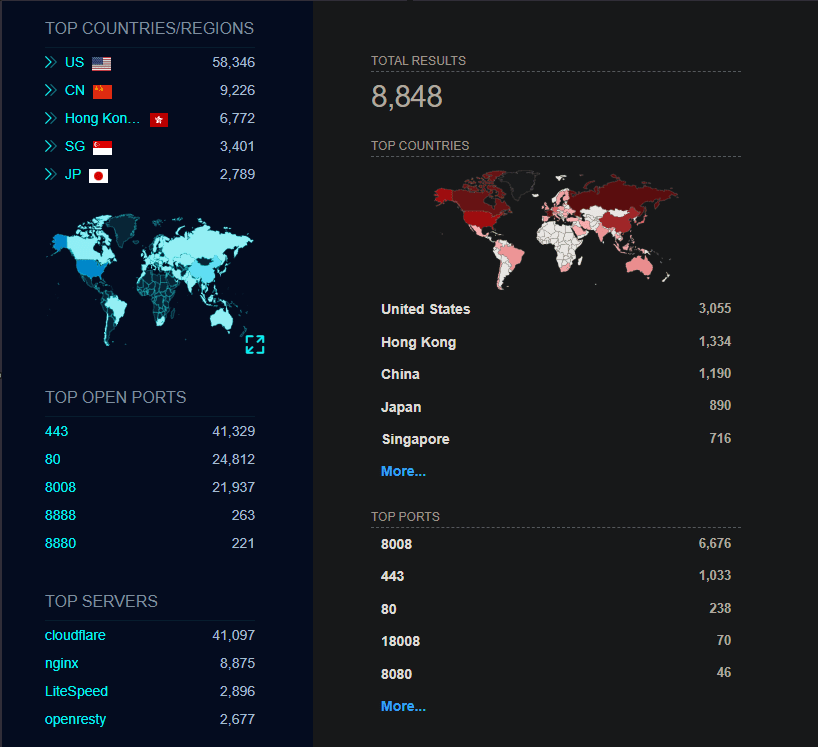
During testing, I noticed this legitimate tool offers an English language option, which made me curious about common deployment locations. Since threat actors can set up infrastructure across many geographies, they can operate from anywhere. However, discovering the USA as the most common location for this software running on the internet exceeded my expectations. Given that the software was designed in China, I did not expect this outcome.
Why Nezha Works So Well as a RAT
The abuse of legitimate tools for malicious purposes isn’t new. Security teams have long dealt with attackers leveraging PsExec, PowerShell, WMI, and commercial remote access tools like TeamViewer or AnyDesk. Nezha fits this pattern but offers some distinct advantages from an attacker’s perspective.
Zero Detection Footprint
The binary is legitimate, open-source software downloaded directly from GitHub releases. It isn’t packed, obfuscated, or modified. Signature-based detection has nothing to flag. In our case, 72 security vendors examined the file and none identified it as malicious.
This isn’t a failure of those security products. They’re correctly identifying that the binary itself isn’t malware. The malicious element is the intent and configuration, not the code.
Full-Featured Out of the Box
Unlike many remote access tools that require customisation or additional modules, Nezha provides comprehensive functionality by default. Interactive shells, file management, and command execution all work immediately after installation. An attacker doesn’t need to compile custom payloads or chain multiple tools together.
Legitimate Network Traffic Patterns
The agent communicates with its dashboard using standard web protocols. The traffic patterns resemble normal monitoring telemetry rather than obvious command and control beaconing. Without inspecting the destination, the network activity doesn’t stand out.
Cross-Platform Support
Nezha supports Windows, Linux, macOS, and even runs on devices like Synology NAS units and OpenWRT routers. An attacker with access to diverse infrastructure can use a single tool and dashboard to manage everything.
Hunting Guidance
Hunting queries that can help identify Nezha agent within your environment.
Recommendations
- EDR Deployment – Ensure Defender For Endpoint is deployed
- Tamper Protection – Prevent attackers from disabling security controls or adding exclusions post-compromise.
- ASR rules table – Four specific rules that intersect with post-exploitation:
- Advanced ransomware protection
- Block credential stealing from LSASS
- Block process creations from WMI
- Block WMI event subscription persistence
- Controlled Folder Access – Protection if attacker deploys ransomware/exfiltrates
- Baseline authorised tools – If Nezha isn’t approved, any presence is suspicious
Conclusion
The abuse of Nezha for post-exploitation access illustrates a persistent challenge in security: distinguishing malicious use of legitimate tools from their intended purpose. The software itself isn’t malicious. It’s well-designed, actively maintained, and genuinely useful for its intended purpose. But those same qualities make it attractive to attackers.
This pattern will continue. Attackers consistently favour legitimate tools because they evade signature detection, blend with normal activity, and reduce development effort. Defenders must respond by focusing on behaviour, context, and anomaly detection rather than relying solely on known-bad indicators.
Indicators of Compromise
References

Rhys is a Threat Researcher at Ontinue. Rhys started his career in IT, as a technician, which is where he discovered the world of cybersecurity. He ultimately decided to complete his degree in cyber and then landed his first role as a SOC analyst in 2021.
He said that what interests him the most about security is malware. He loves analyzing it and breaking it down to uncover its capabilities.