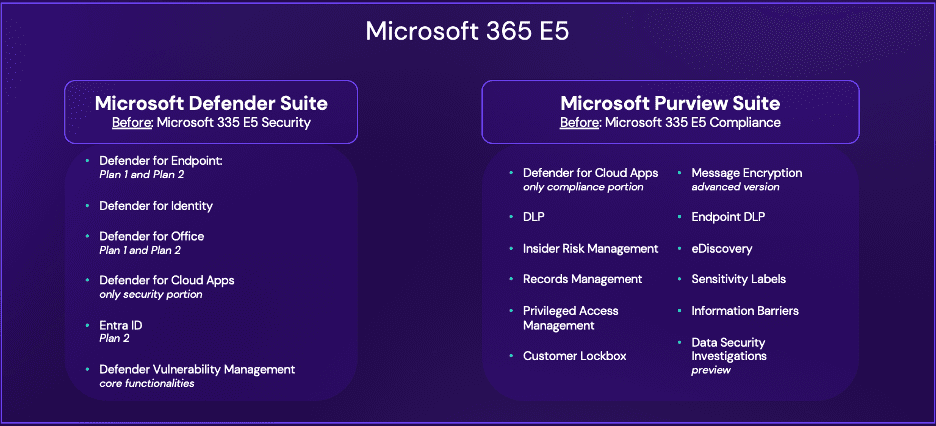
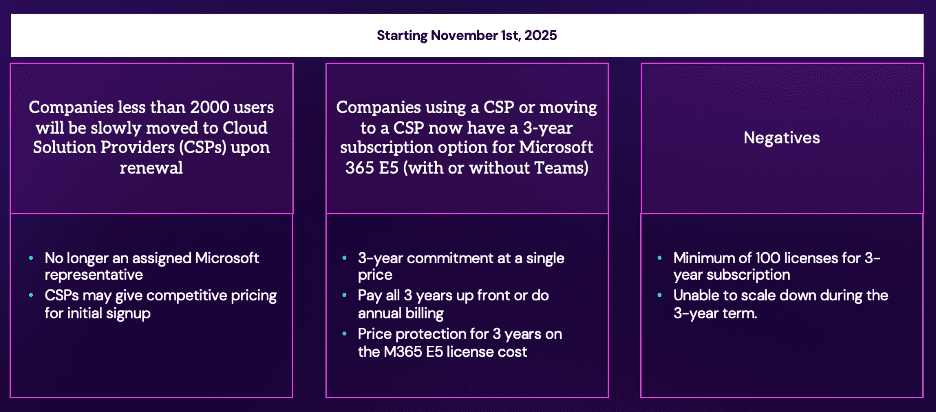
Alright. Hello and welcome. Thank you for joining our webinar, understanding Microsoft’s latest pricing updates and Sentinel Data Lake. If that’s where you are hoping to be, then you’re in the right place. You should see a title slide right now. My name is Chris Taylor with Ontinue, and I’m joined today by Daniel Morris and Yannick Horvat. I’m just gonna give it a second here as I can see the attendees are ticking up. This webinar will be recorded. Just a bit of housekeeping, you can ask any questions you have in the Q and A. We have quite a few people here today, we’ll do our best to get to any questions. If we’re not able to answer your question live in the chat or on the webinar, we will follow-up to get you an answer to your questions. So thank you again for joining. All right. I think in the interest of time, because this is being recorded and we’ve got quite a handful of people on here, I will get us started here. Yannick, would you mind progressing to the first slide here? I’m not, I don’t know if I can actually control it. Thank you very much. Just a quick overview of who Ontinue is and why we’re doing this webinar today. For those of you who may not be familiar with Ontinue, we offer twenty-four seven managed extended detection response services specifically for organizations that leverage Microsoft security tools. We also offer managed services around phishing protection, vulnerability mitigation, and OT security. Our exclusive focus on Microsoft means we bring an unparalleled level of Microsoft and security expertise that allows our customers to get the most security value and efficiency out of their Microsoft investments and their security investments. We deliver our service directly through Microsoft Teams, and our cyber advisers and security analysts leverage an agentic AI based platform. That means that our twenty four seven cyber defense center is able to resolve incidents more quickly, more accurately, and take on more work on behalf of our customers. In fact, we resolved ninety nine point five percent of incidents without our customers lifting a finger. If at any point today or after this webinar, you’re interested in having a conversation to see if there might be a fit for Ontinue to help support your organization, we’ll give you information on how you can get in touch with us. And we we appreciate that that interest, and we appreciate your interest today. So with that, I’ll kick it off and introduce Daniel Morris to and our speakers, Daniel Morris and Yannick Horvat. Thank you both for being here today. Daniel’s gonna kick us off. And again, we’re gonna be talking about the most recent updates to Microsoft’s pricing and the Sentinel data lake. So with that, I will hand it off to Daniel, and thank you again. Thanks, Chris. So, guys, we’re gonna spend a little bit of time talking about license changes just overall from Microsoft. Yannick, if you’ll go to the next slide for me. From this, we’re gonna talk about product name changes that you guys should know. When you talk when you come up to license renewals with Microsoft or if you’re working with a CSP, a couple of things that you should know there. And then, of course, some early Christmas gifts that Microsoft gave us from Ignite. These are all very important things that we’re gonna be able to run with, and Yannick and Jill move forward for me. One of the things is gonna be the product name changes when we talk about the Microsoft three sixty five e five stack. There’s two separate licenses underneath this. If you’ll bring up the full slide real quick, Yannick. One of those is the Defender Suite. So this is a name change from Microsoft. One of the things that they actually did was they moved away from the Microsoft three sixty five e file security license name and actually moved this to Microsoft Defender Suite. The reason why you guys should know this is you might see this change within your tenant. Did wanna let you know that along with the Purview Suite as well, if you have the Microsoft three sixty five e five compliance license that’s in your tenant, that is now called the Purview Suite. Both of these are actually adding a couple of functions within different products. We’ll go into those in a later webinar. One of the things that you should know, of course, with AI being a topic of conversation is gonna be the data security investigations that is in preview. Suggest everybody actually takes a little bit of time, goes and looks at that if you have the preview suite or if you’re using the full Microsoft three sixty five E5 license. If you do have questions, please feel free to reach out to us. We do not resell licenses, but would love to help you figure out what’s the best option for you and your group. Yannick, if you’ll take and click the next, go on and show up the full thing. Starting November first of this year, Microsoft did make some changes. So if you haven’t come up to a renewal yet, you’re less than two thousand users. They are pushing a lot of these companies out to CSPs. There’s no longer gonna be any assigned representative from Microsoft. If you do have some type of representation, it’ll be as you come to talk to Microsoft about some help around licensing, things like that, they’ll assign you a temporary person during those times. One of the good things about this move was actually a positive for you guys. We’ll have the slides back up here in a second. We apologize about any kind of technical issues that we might be having right now with the slides. Yannick, if you’ll go there, you go. Everybody see the slides now at this time? If you can give me a thumbs up or just Alright. There we go. Starting November first, there was a change in the licensing. With this, Microsoft did present a three year subscription option for the Microsoft three sixty five e five license with or without Teams for the CSPs. This is something that is actually new for this year. That means that if you purchase the full e five license, you can actually get a three year commitment as a single price without having to worry about that price going up or down. So whatever you negotiate with the CSP is gonna be, what your price is for that three year term. One of the pieces for this is that you’re gonna pay for it upfront or you’re gonna do annual billing that’s not monthly or quarterly billing and stuff. So that is something that you might wanna know as you talk to your CSPs. When you look at the price protection and stuff, it does stay. The negative part is if you have you have to have a minimum of a hundred licenses for the three year subscription. So if you guys are doing mixed licenses using e three with maybe the e five Defender Suite license that we just talked about or you’re trying to actually take and look at your overall road map for your company, is there gonna be a time where you might have to scale back or scale down? These things you won’t be able to do under that three year agreement. You’ll be stuck at that license tier. So when you do negotiate your license terms and stuff, just take and have a look at that itself. And then, like, if you can move forward for us. So let’s talk about some early Christmas gifts that that Microsoft gave us. If you guys are familiar with the EU, there was a disagreement between Microsoft and the EU as far as how Teams was associated with licensing. That has been adjusted and straightened out. So as of November first as well of this year, now you can actually purchase the full Microsoft three sixty five e five license with Teams, or you can still purchase it without. So they have the two SKUs available. If you guys were part of a renewal last year where you didn’t get Teams because you didn’t have the avail you didn’t have a grandfathered license and stuff already in the tenant as far as using the full m three sixty five and e five license, you can make that move the next time you come up for your renewal. This is something that I would also take a look at just to see if it would be beneficial for you guys and stuff just overall from the those license points. The price point was about the same and stuff. There wasn’t a whole lot of difference in the pricing it was, and you had some negotiations from Microsoft directly that kinda gave some more discounting on the e five without the Teams piece. One of the other parts that you should know about is the announcement at Ignite. If you guys have looked at security Copilot, you’re looking at how you can actually use AI within your security tooling or subset. As of November eighteenth, you do have the ability to use this if you have the Microsoft three sixty five e five license. Microsoft has included four hundred security computer units or SCUs for each each month for a thousand paid user licenses, and you can go up to ten thousand secondurity compute units each month at no additional cost. That’s depending on what your license structure actually is now and how many licenses you’re paying for the Microsoft three sixty five e five license itself. The key component for this is everything that you do within the security license or the Defender Suite license that we talked about earlier will actually be able to be used with the security Copilot, and this is also where I’m gonna turn over to Ionic because he’s gonna start talking to you about the data lake itself and how you can take and not only see calls from the data lake, but how to use the data lake properly. And this is where Security Copilot will come in handy to you guys also. Thanks. Super, thank you very much, Dan. So let’s bring that then to the second topic of today, which is then Microsoft Sentinel. Data Lake has been a new introduction from Microsoft. It has also been a hot topic amongst customers lately to better understand what it is. And that’s the goal of the next twenty minutes. We will take a step back as well and have a very high level touch point on the architecture of Data Lake to understand what it is and what it isn’t, and then we will switch to the pricing model. I’m mindful that there’s different profiles in this meeting attending, not everyone is maybe technical, some people more technical. If you’re not fully on board with what I’m explaining, that is fine. That is not a problem. So Sentinel in its essence, it’s Microsoft SIEM solution. It’s a really good solution with all the features, bells and whistles that you expect from a SIEM solution. But there is one aspect which is a hurdle with many customers, and that is the cost management part. So Sentinel is a solution where you essentially based pay for what you sent and ingest into Sentinel. And if you don’t fully understand the cost model behind it, or you don’t manage what you send to Sentinel, then that can give some surprises at the end of the month when you get the invoice. And for customers that want to ingest a lot of data and keep the finances under control, Microsoft has introduced the Microsoft Sentinel data lake. Let’s have a look at the architecture behind it. I will first briefly explain how it would look like without Data Lake and then how it looks like with Data Lake. As mentioned, Sentinel, it’s the SIEM solution of Microsoft, and you can expect all the SIEM typical SIEM features such as detection capabilities, investigation, AI, threat intelligence features, automation, playbooks, etc. Also, with the SIEM solution, you need a way to store your data. So it also comes with a storage system included. And the way this is where you store all your security data, which you get into Sentinel by using connectors from Microsoft, from partners, you can even ingest Logic Apps, PowerShell, whatever method you use. For those a little bit more technical, you might already know that in the back end of the system, we use a Log Analytics workspace. This is a Azure technology that exists for years that is tested and used by many customers. When you as a customer store data into this system, you can store it in different ways. Option number one is traditional analytics. Essentially, if you store it as that, you pay the most, but you get all the features. You can use all the features from the SIEM solution. The problem is customers with a lot of data that was expensive. So Microsoft came with a second option called basic locks. Short story, long story short, this allows to at a fraction of a price to store your data, but you get limited functionalities. A little bit later, Microsoft introduced auxiliary locks. This is essentially a further iteration of basic locks. The goal is the same, a fraction of the cost, but also limited functionalities. And then option number three is archive. That is if you would like to keep data for a longer period, up to twelve years, also even more cost efficient. For many customers that archive wasn’t sufficient. So customers started building their own archive solutions, usually using Azure technology in the back end, like a blob storage or Azure ADX. It doesn’t sound pretty. It wasn’t also pretty. It also doesn’t integrate them directly with Sentinel. It wasn’t perfect. So Microsoft came then with data lake and changed or extended the architecture a little bit. What Microsoft did was they added a graph layer and they added then the data lake below it. And what happens now is that you have here your storage with the different options that I just explained. All of these options disappear with data lake, except the analytics one. That’s the only option that stays with this architecture. And then data lake is where you store all your raw data, all your verbose data, you put it there. This can be data, activity data saying explaining what happened. This can be asset information, such as the department or the date a person was hired. This can be information about devices like the operating system. This can also be threat intelligence. So all kinds of data you can store in that data lake. So let’s put that architecture on hold and let’s move on to the second subject, which is the ingestion planning. So when you send data into Sentinel, you need to be mindful that you send data that has security value and not just dump anything you have into Sentinel. In order to do that, we advise and not only on Tinue, but this is also a best practice from Microsoft, we advise to split the data that you sent into Sentinel into two categories. Category one is your primary data. This is what we call high fidelity data. Category two is your high volume data. The first one, the high fidelity data, this is the data that you would like to use in your typical active SOC, where you have your detections, where you have your workflows. That’s the kind of data we’re talking about. This typically comes from your endpoints, your email, different Microsoft solutions can also be another cloud like AWS or GCP, where you have some audit trails that you might want to use. That’s what we are talking about here. The second category, the high volume data, that is the data that you can ingest into Sentinel. That is still valuable to a certain extent, if you would like to investigate more deeper, if you would like to do forensic investigations, you typically don’t query it that often. Maybe that’s the kind of data that you need for compliance reasons for a long time. That’s what we’re talking about high volume data, usually coming from firewalls, networks, diagnostic information application information that type that is usually more verbose. Henri Now, if we think back about the architecture, we are going to store the high fidelity data into the analytic logs and the high volume data into the data lake. So back in the architecture, that means the primary data comes here and the secondary data comes here. Looks complicated to split in the architecture, but from an end user perspective, this is pretty transparent. Okay. Just also one small note, which will come back in the cost model or will be relevant in the cost model. Any data that you store in analytics first will also be duplicated in the back end into data lake. Yeah. So anything you store here will be duplicated here and available here as well. That can be useful if at a certain point in time, you would like to move from analytics to data lake for long term. And also, if you would like to do correlations here with data from here, then it’s already available because it’s duplicated. Good. With that small overview of the architecture, let’s switch then to the cost model itself. Again, if not everything was clear, that is fine. We are over good. We are going over this pretty fast. To the cost model of Sentinel, I will focus on how it looks like in the new setup with Data Lake. So Sentinel in its essence, the way the costs are split, that didn’t change very much. So the biggest cost of Sentinel still comes from the ingestion into Sentinel, that would be around ninety percent. Then there is around ten percent that you will pay for keeping it there. This can be short term, but this can also be long term. And then there is a small cost for extra stuff. I will come to that in a second. This cost is very small, either it doesn’t exist, because you’re not using it or it stays under three percent. So in the next slide I will explain. I’ve tried to make a one slider to explain the model. In my personal opinion, it isn’t super great always explained in the Microsoft blocks at the Microsoft videos. So I have attempted to do it better. I’ll leave it up to you to judge if it is better explained or not. So the next slides will show all the content in one go, but we will go through it step by step. So as explained in the architecture, we now have two ways of storing it. We have the analytics tier for the primary data and the data lake tier for the secondary data. And to calculate the price in such a tier, we need to consider the different components that have price implications, ingestion, retention, executing operations and optional stuff. So if we start with ingestion, then we see that analytics tier and data lake tier both are based on the gigabytes that you send into the system with analytics tier significantly more expensive at four euros and thirty cents versus fifteen cents in the data lake. Now, fortunately, in the analytics tier, there are optimizations possible. You can either stay pay as you go and pay the list price, or if you consume a lot, you can choose for a commitment tier. A commitment tier is usually starts at fifty gigabytes, then there is hundreds, hundred fifty or two hundred, it goes up in different tiers. And for example, if you choose fifty, that means you commit to using at least fifty gigabytes per day ingestion, and then you get better pricing. This tier can always be changed after a month, you don’t need to commit to this for a full year. Then there’s also ingestion options, ingestion saving options. I’ll come back in the next slide. I’ll leave that for now as it is. I’ll explain that in more detail next. With the data lake tier you don’t get price savings or extra benefits. However, as I explained earlier, if you first ingest the data via the analytics tier, and at a certain point in time you decide to move it here to keep it for a longer time, you don’t need to pay that ingestion again. Because as I mentioned, it gets already duplicated in the back end. For our friends across the ocean, these prices are here, list prices in euro. It’s more or less the same in dollars, And it always varies a little bit anyway, depending on the Azure region that you’re using, but it gives you a rough idea. The second option is retention. Also with retention, it’s all based on the gigabytes that you ingest both for data lake and analytics. Also here analytics slightly more expensive than data lake. However, analytics comes with the advantage that everything you send in there is always free the first three months. So you only start paying for retention as of month number four. Yeah. With data lake you don’t have something like that. However, Microsoft has implemented a technical improvement a few weeks ago. They have implemented compression with a one to six ratio, which essentially means if you store six hundred gigabytes in data lake, it effectively only stores one hundred gigabytes because of the compression. And that also impacts your price, because you can essentially divide your calculation by six. Analytics tier you can store up to two years, Data Lake tier up to twelve years. Then the next thing is operations. Operations are fully free in the analytics tier. Let’s say you have paid more than enough to get it into Sentinel. So Microsoft is so generous to let you do all the queries, all the threat hunts, all the use cases you have, all the lookups, you can do as much as you want, whenever you want. For data lake, there you pay for the queries you execute. No matter what type of query you execute, you pay per gigabyte that is analyzed. Now, the number of the ideas that you don’t continuously execute queries in the data lake. For customers in a more advanced situation, there is the advanced data insights. That’s a very fancy way of saying, hey, look, we can execute Jupyter notebooks. There you pay per compute hours. And then finally, there is some optional capabilities. These only apply to the analytics tier. That is if you want to use automation with Azure Logic Apps or user entity behavior analytics, that cost is very low. Also, if you want to use Sentinel, the Sentinel solution for SAP, that is a flat price per SID. Okay. I mentioned very briefly that here in the analytics tier you also have ingestion savings, they are not new, they already around for a long time. So that’s for example, for existing E5 and E5 secondurity users, you get a five megabyte per user per day benefit for ingesting Microsoft sources. If you use Defender for Server Plan two, you also get five hundred megabytes per day per VM to ingest data that is generated by this Defender solution. There are also some free Microsoft sources like Azure activity logs, office logs, and alerts from the defender solution. And last but not least, an indirect benefit. You always have various ingestion, for example, in the weekend, there is typically less activity. So you ingest less data. I hope that’s a little bit clear. I know that Microsoft introduced data lake and that didn’t make the whole cost model easier. So I hope this helps. I know it’s not that easy to now calculate data lake. That is why we have also made a few calculations based on t shirt sizes. We will share the slides with you, so you can go through this at a more calmer pace. We have made some calculations based on t shirt sizes. So for example, small would be ingestion of twenty five gigabytes per day into the data lake. So if we go through the different components very briefly, that means for ingestion, you pay zero euros if this would come directly from analytics into data lake, because remember, it’s duplicated in the background. If you would ingest this data directly into data lake from the beginning, that would be around hundred thirteen euros per month with an ingestion of twenty five gigabytes per day. That is, in my opinion, a very low amount. Similar for retention, for this simulation, we keep data for one year in Data Lake, and that would mean you pay two hundred forty three euros per month. And if we divide that by six, because of the compression they do, that would be thirty nine euros. Also, in my opinion, a very cheap offer there. Now then the operations itself, as I mentioned, you pay for the operations. So for example, a single KQL query, where we search over six months of data and use twenty five percent of all the data available, that would cost around six euros. I will share the slides with you. There is also slides with more advanced use cases where we have made simulations, so you can have a look at that at your own pace. Unfortunately, this brings us already to the ending, but the time goes very fast. I do share a few extra resources with you. So we didn’t go in the technical aspects today. That was not the goal. If you would like to see how the solution looks like, there is a demo video of around one to two minutes from Microsoft. Have a look at it. There is also a link on how you can get started with data lake. It’s not that complicated. It’s also explained there as well. And if you would like to calculate the price yourself, if you want to do simulations for yourself, in general, the Azure pricing calculator is a very good tool to use. However, at this moment, for data lake, I do not recommend this tool because I have noticed there are some inconsistencies and things that are not fully correct when it comes to calculating data lake. Microsoft is aware of that, they have acknowledged that as well. But so my recommendation is do it yourself manual, talk with a Microsoft representative, or you can also talk with us. We have these conversations with customers, and we can help you build an estimation of Sentinel costs, including Data Lake. So with that, I am handing it over to Chris to wrap it up. Yeah, thank you Janik, thank you Daniel, thank you everybody for joining today. Like Janik said, we’ll send these slides out to you, so you’ll be able to have access to the links and everything that are contained in all the different tools and resources. I’m gonna drop a few links into the chat right now. Just a few possible next actions, next steps for you. I recommend joining the Defender user group. It’s free to join. It’s a community of over six hundred Microsoft Defender for Endpoint users, and we host monthly meetings and sessions. The next session will be next Thursday. It’ll be focused on expanding Defender for Identity coverage to Intra Connect, and we get great speakers to really active and engaged community of fellow Microsoft Defender users. And again, if if you are looking for help with your managed security strategy, again, on Tinu, we offer twenty four seven managed extended detection response. We have unparalleled Microsoft expertise, we’d love to talk. So you can contact us through our website. Thank you again, and I think with that, we’ll call it a session, and hope everybody has a wonderful day and rest of the week. Thank you.