
Executive Summary
One important note is Microsoft frequently changes product names and associated licenses by adding or removing products or by simply creating new categories. As such, Ontinue frequently updates this guide with the latest publicly available information. This guide was last updated on November 25th, 2024.
To receive specific and detailed advice about your licenses and how you can reduce shelfware to save costs and improve on security, Ontinue offers a free evaluation of your portfolio and how to best maximize its use.
The Basics of Microsoft Licensing
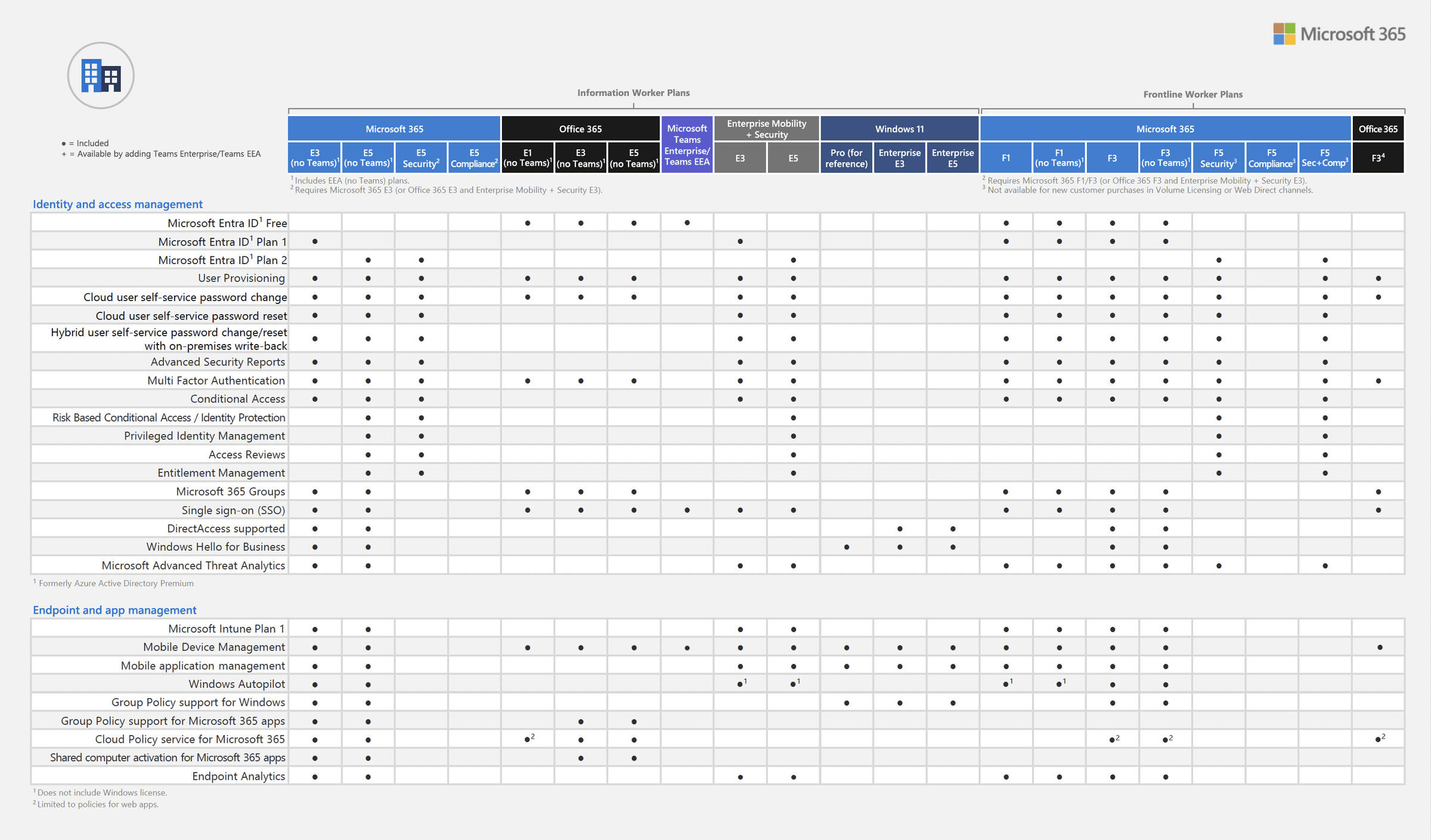
What’s included in the licensing packs varies frequently. The following figures detail what identity and security products are included with which specific licenses as of September 1, 2024. This changes frequently so please contact Ontinue for current information.


Identity Protection
Identity protection should matter most to all organizations. No matter how much money has been spent on firewall, anti-virus, and other security protection, if a hacker compromises an identity, they have full access to corporate resources. This is because the security infrastructure sees the hacker as the identity of the of the compromised user and authorizes the hacker with the exact same access. Today 80% of all hacking attempts are identity based.
Most organizations are already using Microsoft Entra ID (formerly called Azure AD) as their identity access management (IAM). User and password management has always been a headache for IT. To solve this problem, organizations implement Multi Factor Authentication (MFA) and conditional access which force users to use a second tool to authenticate – typically their mobile phone and look at additional variables such as device configuration and location. The problem with the E3 Entra ID is that although it now supports MFA and Conditional Access, it has no way to detect a compromised user. This shortcoming has historically forced IT to buy additional products such as Okta and Ping to augment the deficiencies of E3 Entra ID. With E5’s enhanced capabilities, organizations can remove these products to save money.

With E5, Entra ID includes Identity Protection which enables organizations to detect, investigate, and remediate identity-based risks. These identity-based risks can then be used for Risk Based Conditional Access. This enables the administrator to create access policies by configuring sign-in and user risk conditions and by choosing an access control method. During each sign-in, ID Protection sends the detected risk levels to Conditional Access, and the risk-based policies apply if the policy conditions are satisfied. In addition, with Privileged Identity Management organizations can manage, control, and monitor access to important resources in the organization.
Endpoint and Network Protection
Identity should matter most to an organization but a close second should be its endpoint and network protection. The problem with this protection is that it requires significant time and resources for an organization to deploy, maintain, and monitor it correctly. Gartner found that less than 10% of their large enterprise clients were capable of doing so, resulting in higher risk and more frequent security breaches. Many organizations only use desktop anti-virus. Running only desktop anti-virus on a user’s device will detect common malware but it has no way to detect advanced threats such as ransomware or stop the spread of it across a network when an infection occurs.
The E3 license only includes basic desktop anti-virus. It does not include Endpoint Detection and Response (EDR). EDR allows for the correlation of all events across all the organization’s endpoint devices including PC, MAC, and mobile. With all events reported to a single location, IT can now find and remediate against many more threats and respond to them on a corporate basis versus each device having to detect and respond to an event. To do this correctly, organizations need to have IT staff monitor the EDR system 24 hours a day and 7 days a week as most hacking occurs outside traditional business hours. Since most mid-size and large enterprises don’t have these resources, organizations turn to Ontinue to deliver Managed Detection and Response (MDR) which then eliminates the need for any additional IT staff while providing government grade security protection.
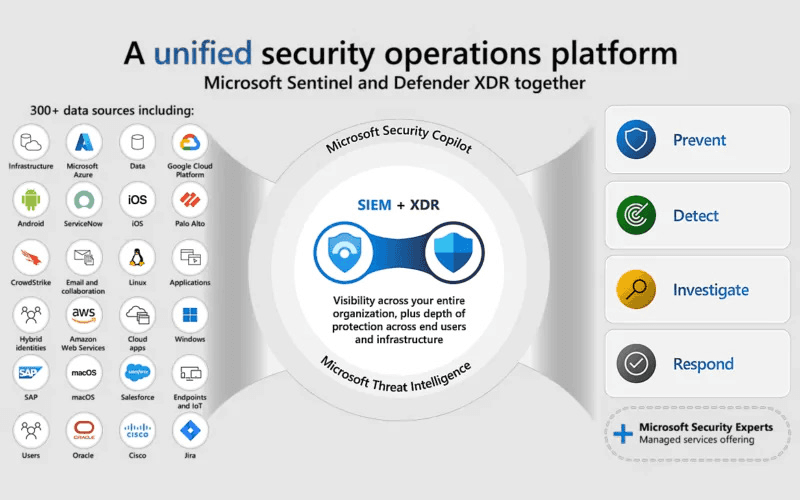
To add additional level of protection, it is now possible to combine the data received in an EDR system combined with all the data from network devices. This is known as Extended Detection and Response (XDR). With XDR, Ontinue can find and remediate against a greater number of threats more quickly across the entire organization. With a managed XDR solution, organizations can be confident that a much greater number of threats such as ransomware are detected and remediated against before becoming a much larger scale problem.
Data Loss Prevention (DLP) and Anti-SPAM protection
Ask any Chief Information Officer (CIO) if they care about security and most will say yes but it isn’t their top priority. Ask the same CIO if they care about data loss, and all will say it is extremely important. As such they have deployed DLP and anti-SPAM tools such as Proofpoint, Digital Guardian, Mimecast, or Zscaler. With E5 these products are no longer required and can be removed to save money.
Microsoft Defender for Office enables the manual, default, automated, and mandatory sensitivity labelling in Office 365, Exchange, SharePoint, and OneDrive. It can also provide DLP for emails and files.
The anti-SPAM feature helps reduce junk email by using proprietary spam filtering (also known as content filtering) technologies to identify and separate junk email from legitimate email. The spam filtering learns from known spam and phishing threats and user feedback from Microsoft’s consumer platform, Outlook.com.
Cloud Application Protection
Driven in part by the global pandemic, organizations have accelerated their embrace of the cloud and increased their use of third-party cloud-based applications. The core problem for organizations with these applications is that IT no longer controls how data is stored, accessed or managed in the application and has far less control over user behaviors. For example, an employee might download all data to a local PC just before quitting. To combat this, technology known as a Cloud Access Security Broker (CASB) has become a common tool to control cloud applications.
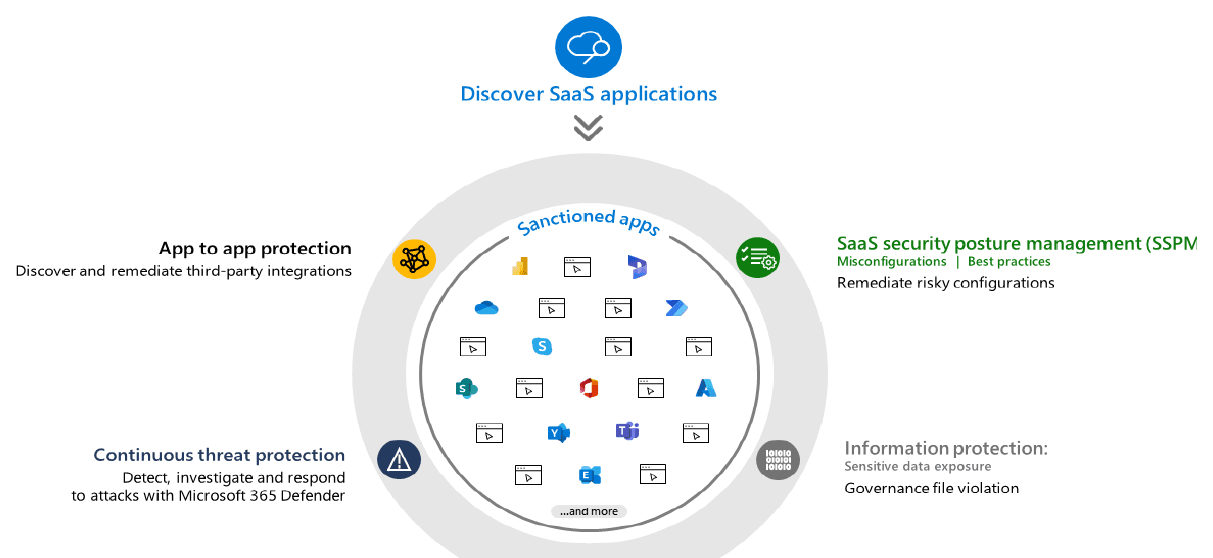
A CASB gives IT visibility into what and how applications are being used. It can discover, control, and configure apps to ensure employees are using trusted and compliant applications. It can protect data leakage by classifying and protecting sensitive information at rest, in use, and in motion. It also can control how the applications are accessed and under what conditions such as device, location, and time. CASBs can also regulate how apps interact with each other. Microsoft’s CASB is called Defender for Cloud Apps and is included as part of the E5 license. With it you can remove your existing CASB such as Netskope, Zscaler, or Skyhigh CASB to reduce costs.
Compliance and Auditing
Ask a Chief Security Officer (CISO) which matters more security or compliance and all too frequently the answer is compliance due to the legal ramifications of being a non-compliant organization. Commonly deployed tools such as OneTrust, Resolver, and Vanta can now be replaced with an E5 license which includes Purview (a combination of Azure Purview and Microsoft 365 compliance solutions).
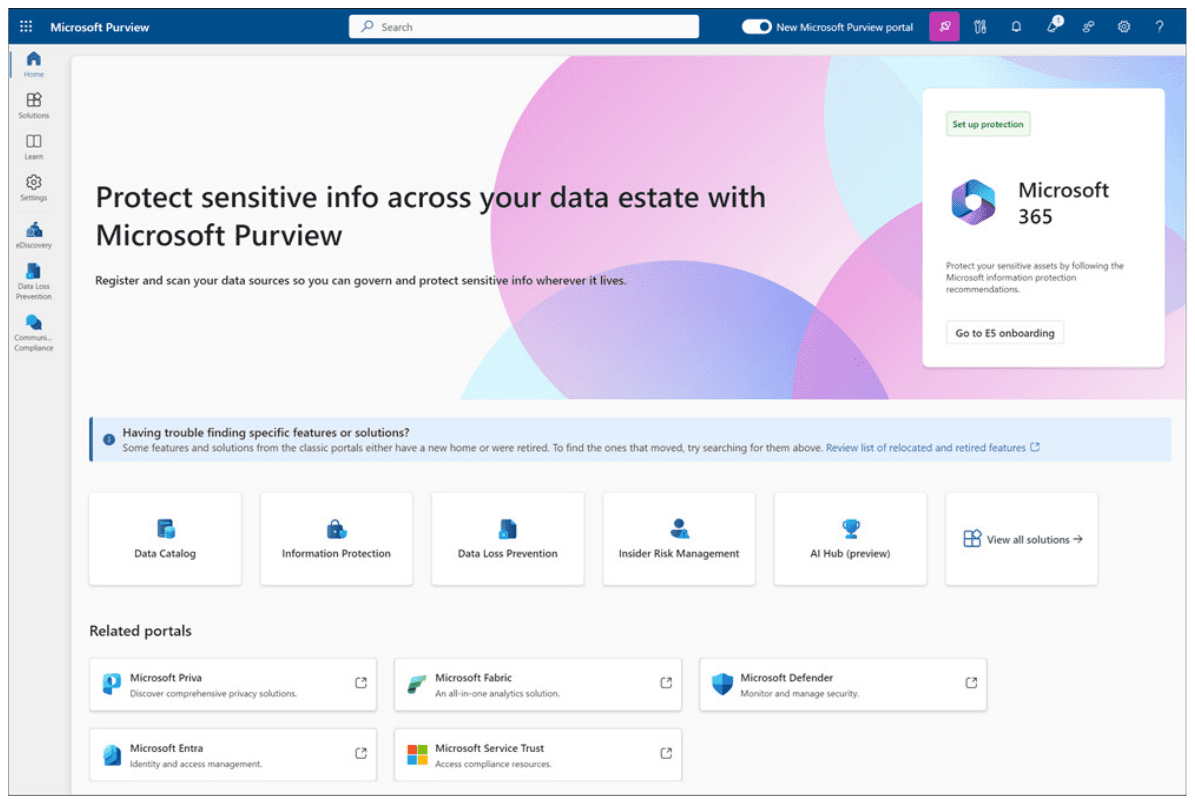
Purview helps organizations govern, protect, and manage data, wherever it lives. It provides integrated coverage and helps address fragmentation of data visibility across organizations. It helps safeguard and manage sensitive data across its lifecycle wherever it lives, providing governance of data and the ability to manage critical risks and regulatory requirements
Configuration, Deployment, and Management
It might sound surprising but the number one issue Ontinue sees with new clients is misconfigured security products. These misconfigurations range from basic policy errors to security rules in place that no current employee can fully explain. Oftentimes, misconfigurations result from otherwise sophisticated security teams not fully grasping the myriad ways in which disparate best-of-breed solutions need to integrate with one another.. Every security configuration and policy should be continuously audited and verified as current and correct to maximize both usability and security.
Deployment of a system as complex as Microsoft’s Entra ID, Defender for Cloud Apps or Sentinel incorrectly can in the worst cases result in security breaches as well as potential outages of service. Deployment and configuration should be performed with the assistance of a certified professional who has experience with the products being deployed.
Contact Ontinue if you are interested in a free security strategy review.
Summary
Microsoft naming and licensing is confusing and changes regularly. This causes confusion as to what features and functionality are available resulting in the purchase of unnecessary software. To alleviate this problem, a few basic questions need to be answered to determine if an organization is getting the most from their products and Microsoft license:
What product licenses are owned?
What is deployed today?
Which of the 3rd party products that are currently deployed can be migrated to Microsoft?
How often are the products updated?
How many people are on staff supporting these products?
What hours are the products monitored and maintained? 24/7/365?
When was the last time an audit was performed of the infrastructure and security?
Knowing the answers to the above questions is often impossible. Ontinue can conduct a free audit of your licenses and infrastructure. Please reach out to us to schedule a consultation.
Ontinue MXDR Helps You Get More out of Microsoft
The Ontinue ION Managed Extended Detection and Response (MXDR) service understands your Microsoft environment to give you more. We help you get greater efficiencies, continuous protection, and faster response times. All with an AI-Powered MXDR that provides superior protection.
We’ve intelligently aligned our platform and services with the industry-recognized leader in integrated security solutions—Microsoft. Our powerful Ontinue ION Platform was custom built for Microsoft’s security and collaboration tools, including Defender, Sentinel, Azure, and Teams.
What Our Customer Have to Say
“The service is based on Sentinel and well designed into M365. They help you to enable and configure all required logs (if not done yet).”
Head of IT Infrastructure - Energy and Utlities
“Helped us undertstand and use the Microsoft enviornment that we had and never used its maximum capabilities”
IT Security & Risk Management - IT Services
“Resources will be allocated to Teams Bridge from Ontinue within 10-15mins. Recommendations from Advisors are top notch, and we were able to leverage our Microsoft E5 licenses better.”
IT Security & Risk Management - IT Services
“We are a Microsoft shop and it utilizies these tools which works well for us. We also like the Teams integration.”
CIO - Consumer Goods


